How Framer prices

Captured October 26, 2026 at 1440px wide.
Framer plans and prices
| Plan | Price | Billing |
|---|---|---|
| Free | $0 | |
| BasicCreative personal sites | $10 | per month |
| ProHighlightedGrowing professional sites | $30 | per month |
| EnterpriseMission critical sites | Custom |
As printed on the page captured October 26, 2026.
How does Framer pricing work?
Three meters stack. The base is a flat site plan, Basic at $10 per month for 'Creative personal sites' and Pro at $30 per month for 'Growing professional sites'. On top sits a credit allowance chosen in each card, from 1,000 AI credits / month up to 15,000 on Basic and from 3,000 up to 100,000 on Pro, and the FAQ explains that credits power Agents, Localization and other AI features and are 'shared across your entire workspace and its editors'. Third is seats: 'Workspace owner' and 'Viewers' are Free, 'Additional editors' are $20 per editor and 'Content editors' $10 per editor, with 10 seats on each paid plan. One row reads the whole model: Limits, subtitled 'Scale with usage', runs Fixed, 'Flexible pay what you use' and Custom across the columns, so Basic buys a ceiling, Pro buys a rate card, and Enterprise is set by contract. Add-ons form a fourth axis, with Translation locales at $20 per locale, Convert at $50 per 500,000 events and Advanced hosting at $200.
The motion is product-led with an enterprise trial at the top. The headline, 'Start free, then scale your site', names the path, a 'Yearly billing' switch sits beside it, and Pro carries the only filled button, 'Start with Pro'. Both paid cards list 'Free custom domain' followed by '2× credits first month', so the first billing period opens with a doubled AI pool, and the Free card now lists 'MCP Server' beside 'Design pages'. Enterprise, for 'Mission critical sites', reads Custom with 'Credits with volume discounts', SCIM and SSO, and its CTA is 'Request Trial', so even the largest buyer starts by building. A single line under the cards, 'Additional editors are $20 / month, and viewers are free.', answers the seat question before the logo strip. A long comparison grid follows in sections, an unnamed limits block, then Agents, Live collaboration and Add-ons, each with a one-line subhead, closing with the three CTAs repeated and an FAQ shown open.
Under the hood, Pro is a platform fee with metered overage on four resources, each with a published increment and cap: pages at '150 then $20 per 100 (700 max)', CMS collections at '10 then $40 per 10 (40 max)', CMS items at '2,500 then $20 per 10,000 (40,000 max)' and bandwidth at '100 GB then $40 per 100 GB (2 TB max)'. Static files now read 50 on Pro, and the $200 Advanced hosting add-on raises that to 'up to 500 static files' with '6 Firewall rules', while 'Enterprise plans include up to 50 firewall rules', so hosting controls step up from plan to add-on to contract. Credits are a workspace pool attached to the site plan, the MCP Server connector reads 'Free during preview' on every tier, and 'Pro Experts consume 50% less agent credits per prompt', which points to a per-prompt rate table behind the credit meter that varies by customer type. The first-month bonus moves the usage meter and leaves the list price intact, a promotion shape that fits where AI pricing is heading. Worth borrowing: printing the marginal price and the hard stop in the same cell turns a usage-priced plan into one a buyer can budget.
What does Framer's pricing page do well?
- Overage rates and hard ceilings are printed together in the same cell: '150 then $20 per 100 (700 max)' for pages, '2,500 then $20 per 10,000 (40,000 max)' for CMS items, '100 GB then $40 per 100 GB (2 TB max)' for bandwidth
- One 'Limits' row declares each plan's approach, Fixed, Flexible pay what you use and Custom, before any individual limit is listed
- '2× credits first month' is printed as a card feature on both paid plans, right beside the in-card credit dropdown it multiplies
- Every seat type is priced, including the ones that cost nothing: workspace owner and viewers free, additional editors $20, content editors $10
- Add-ons carry prices in the grid, '$20 per locale', '$50 per 500,000 events' and '$200' for Advanced hosting, and the expanded FAQ spells out what the $200 buys: '6 Firewall rules' and 'up to 500 static files'
What does Framer's pricing page reveal about its pricing strategy?
- Basic buys a fixed ceiling and Pro buys a rate card, a platform fee plus metered overage with a published cap on each resource
- AI credits are a workspace pool selected inside the plan card, and '2× credits first month' is an onboarding grant on that pool that leaves the subscription price unchanged
- 'Pro Experts consume 50% less agent credits per prompt' prices the partner channel into the credit burn rate itself, alongside free editor access on client projects
- MCP Server reads 'Free during preview' on Basic, Pro and Enterprise, so the connector to outside AI tools is an adoption play ahead of any meter
- Enterprise starts with 'Request Trial' and 'Credits with volume discounts', which points to committed credit volume as the enterprise lever
Learn with Orb
- ProductPrepaid credits AI credits are a workspace pool picked from a dropdown in each paid card, with credits at volume discounts on Enterprise; Orb's prepaid credits cover plans built on credit allocations and bulk discounts.
- ProductSpend controls Pro prints each overage rate beside a hard ceiling, such as 150 pages then $20 per 100 up to 700; Orb's spend controls keep usage visible and predictable, with no surprise bills.
- Guide8 SaaS pricing models: how to choose one A flat site fee, seats priced by role and a monthly credit allowance stack into one hybrid; Orb's CEO walks through flat rate, per seat, usage-based and hybrid models and how to choose.
Questions about Framer pricing
How much does Framer cost?
Framer's pricing starts at $10/mo. The page shows 4 plans, including a free plan, with the top plan priced through sales.
What pricing model does Framer use?
Framer prices with flat-rate tiers, combined with credits and per-seat pricing. Buyers can sign up on their own or go through the sales team. Its plans are aimed mainly at small businesses.
Does Framer have a free plan?
Yes, Framer has a free plan. Paid plans start at $10/mo.
Does Framer offer an annual discount?
Framer offers monthly and annual billing; the page doesn't state the discount. The listed prices start at $10/mo. Terms for the plans priced through sales are set with the sales team.
How is Framer's pricing page laid out?
The page shows 4 plans, highlights Pro, and includes a comparison table, a calculator and an FAQ. The breakdown above marks 14 points on it: 8 things it does well and 6 insights into the pricing.
How do AI credits work on Framer?
Every Framer paid plan includes monthly credits that power Agents, Localization, and other AI features, and they are "shared across your entire workspace and its editors" for the whole team. Buyers choose an allowance inside each plan card, from 1,000 AI credits / month up to 15,000 on Basic and from 3,000 up to 100,000 credits / month on Pro, and both paid plans include "2× credits first month" as a card feature. The comparison table notes you can "add credits anytime" on paid plans, and workspaces with no active subscription receive 500 credits to try Agents.
What happens if I go over a limit on Framer Pro?
Framer Pro uses "Flexible pay what you use" limits, with each overage rate and cap printed together, such as "150 then $20 per 100 (700 max)" for pages and "100 GB then $40 per 100 GB (2 TB max)" for bandwidth. CMS collections run "10 then $40 per 10 (40 max)" and CMS items run "2,500 then $20 per 10,000 (40,000 max)" on the same plan. For limits like bandwidth, Framer allows you to exceed your limit for one month and sends an email notification so you can upgrade your plan accordingly.
How much is the Framer Convert A/B testing add-on?
Convert, which covers A/B testing, Funnels, and customization with Triggers, is priced at $50 per 500,000 events on the Pro plan. You are billed on the number of analytics events your site generates each month, where an event can be a page view, a click on a tracked link, or a submission through a tracked form. The add-on lets you run up to 5 A/B tests and is billed as part of the billing cycle for the associated plan.
From the page as captured October 26, 2026. Current prices are on framer.com

Webflow
$15/site/moWebflow prices per site: Starter is free, Basic is $15/mo and Premium $25/mo billed yearly, and Platform plans begin with Team at $2,500/mo on an annual contract before a custom Enterprise. Premium carries a bandwidth dropdown from 50 GB to 2.5 TB, and the add-ons are metered on their own units, page views, sessions and locales, so traffic and reach set the bill alongside the plan.
Squarespace
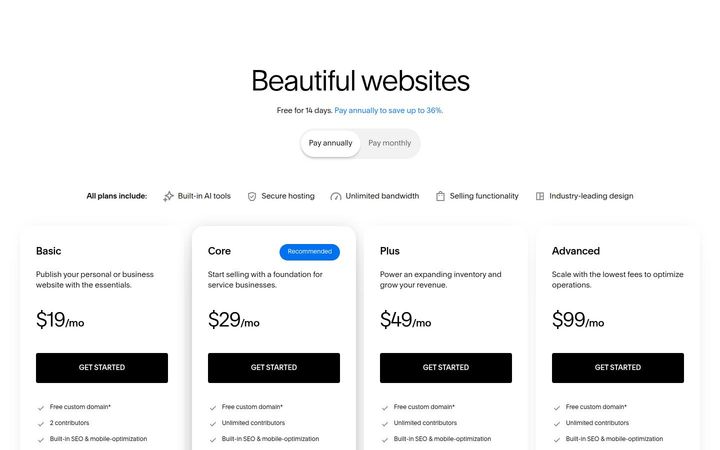
$19/moSquarespace sells four flat plans at $19, $29, $49 and $99 a month with Core recommended, and each card pairs the subscription with a falling card rate, from 2.9% + $0.30 down to 2.5% + $0.30, and a growing AI credit allowance, from 10 one-time credits to 120 a month. Higher plans buy down the share Squarespace takes on sales and add commerce tools, and every plan is bought online through the same 'GET STARTED' button.
Anthropic (Claude)
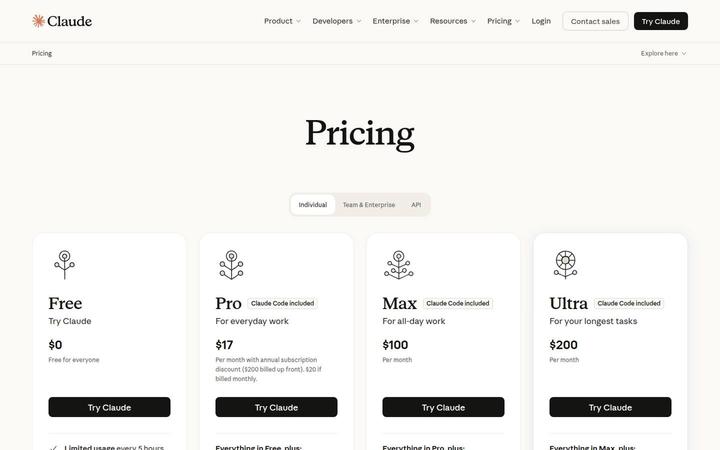
$17/moClaude sells four individual plans, Free, Pro at $17 a month on annual, Max at $100 and Ultra at $200, and what separates them is usage itself. Max is 5x Pro in both the five-hour and weekly windows, Ultra is 10x Pro weekly with no 5-hour limit for verified accounts, and both top plans carry a monthly API credit. One URL carries individual, team and API pricing, and the FAQ prints the enterprise rate.