How Resend prices

Captured October 26, 2026 at 1440px wide. The page continues below the crop (9,513px in total).
Resend plans and prices
| Plan | Price | Billing |
|---|---|---|
| Free | $0 | / mo |
| Pro | $20 | / mo |
| Scale | $90 | / mo |
| EnterprisePerformance at any scale | Custom |
As printed on the page captured October 26, 2026.
How does Resend pricing work?
The value metric is emails sent per month, packaged as quota tiers with a flat marginal rate. Free is '3,000 emails / mo' with '100 emails a day', 3 domains and '3 inboxes', Pro is '50,000 emails / mo' with 'No daily email limit' and 10 domains, Scale is '100,000 emails / mo' with 1,000 domains and a 'Dedicated Slack channel', and Custom is 'Enterprise' with a '99.99% uptime SLA' and a 'Custom usage plan'. Two more meters sit beside email: Automations at '$0.0015 / run' after 10,000 free runs, and Inboxes at '$1 / inbox' after 3 included inboxes. Three add-ons are priced flat: Domains at '$20 / mo' for 100 more, Dedicated IPs at '$30 / mo' and Single Sign-On at '$150 / mo'. Quotas with a flat overage suit transactional email, where volume is predictable and a bill that steps is easy to plan.
'Start for free and scale as you grow.' sits over a Transactional emails and Marketing emails switch and a slider from 3,000 to '3,000,000+', which marks the matching card 'Recommended'. Free, Pro and Scale share 'Get started' and Custom offers 'Contact us', so the motion is self-serve through Scale and sales-led above it. An 'Are you an AI agent? See pricing' link sits under the cards. Then come the Pay-as-you-go section with three meters, the Add-ons section, a six-part comparison table that now includes an Inboxes section, a 'Trusted by' logo grid, fifteen FAQ questions, a testimonial marquee and 'Start sending this afternoon' with 'Sign up for free'.
Under the hood, Pro and Scale bill extra email at the same '$0.90 / 1,000', so the marginal price of email holds flat across plans and Scale is priced on capability. At 100,000 emails, Pro plus overage comes to $65 and Scale to $90, and the step buys 1,000 domains, the dedicated Slack channel, 500 AI credits and access to Dedicated IPs and SSO. Inboxes are metered as a resource while their traffic stays on the email meter: 'Inbox emails use your transactional quota.' The table gives every plan 'Threads' and 'Agent access' on inboxes, which points to inboxes built for software agents as well as people. Each meter is a deliberate choice, enabled per line, and the agent pricing link is a bet on where buying is going, with coding agents choosing infrastructure for their users.
What does Resend's pricing page do well?
- A volume slider with Transactional and Marketing tabs sits above the cards and marks the fitting tier 'Recommended', so a buyer starts from their own volume
- One overage rate, 'Extra emails: $0.90 / 1,000', is printed on both Pro and Scale, so the marginal cost is visible before signup
- Each meter, emails, automations and inboxes, has its own 'Enable pay-as-you-go' switch with the charging rule stated in a sentence
- The Inboxes table section shows allowance, unit price and quota source in three rows: 3 included, '$1 / inbox' extra, 'Transactional quota'
- The FAQ answers each new pricing concept directly, with 'How are inboxes priced?' and 'Is there a plan between Free and Pro?'
What does Resend's pricing page reveal about its pricing strategy?
- Quota tiers with a flat overage: email costs the same at the margin on every paid plan, and the plans differ by capability
- Inboxes are priced per unit at '$1 / inbox' while inbox traffic draws on the transactional quota, so the resource and its usage are billed on separate meters without overlap
- 'Agent access' on inboxes across every plan points to agents as inbox holders, a metric that grows with automation
- Automations carry their own meter at '$0.0015 / run', separating workflow usage from send volume
- 'Are you an AI agent? See pricing' addresses agents as buyers, a sign of where developer infrastructure is sold next
Learn with Orb
- ProductExperience Kit A volume slider with Transactional and Marketing tabs marks the Recommended tier above the cards; Experience Kit builds calculators like this on one source of pricing truth so buyers plan spend.
- ProductSpend controls Overage is opt-in behind an Enable pay-as-you-go switch; Orb's spend controls cover the alerts and workflow triggers that keep sending past a quota visible and predictable.
- GuidePay-as-you-go pricing for SaaS One overage rate, $0.90 per 1,000 extra emails, applies on both Pro and Scale; Orb's pay-as-you-go guide covers revenue that scales with use and the common ways to structure it.
Questions about Resend pricing
How much does Resend cost?
Resend's pricing starts at $20/mo (50,000 emails). The page shows 4 plans, including a free plan, with the top plan priced through sales.
What pricing model does Resend use?
Resend prices by usage, combined with flat-rate tiers. Buyers can sign up on their own or go through the sales team. Its plans are aimed mainly at developers.
Does Resend have a free plan?
Yes, Resend has a free plan. Paid plans start at $20/mo (50,000 emails).
Does Resend offer an annual discount?
Resend's pricing page shows a single billing period. The listed prices start at $20/mo (50,000 emails). Terms for the plans priced through sales are set with the sales team.
How is Resend's pricing page laid out?
The page shows 4 plans and includes a comparison table, a calculator and an FAQ. The breakdown above marks 14 points on it: 9 things it does well and 5 insights into the pricing.
What happens if I send more emails than my Resend plan allows?
Resend's email pay-as-you-go option lets you "Continue sending and receiving emails beyond your quota." Resend automatically charges your plan's overage rate for each additional bucket of 1,000 emails, and both Pro and Scale list "Extra emails: $0.90 / 1,000". The option is available to paid subscriptions and is turned on with an "Enable pay-as-you-go" switch.
How much do extra inboxes cost on Resend?
Every plan starts with 3 inboxes for free, and with pay-as-you-go enabled, Resend charges "$1 / inbox" for each additional inbox per month on Pro and Scale. Enterprise inbox limits are listed as "Flexible". Email sent and received through inboxes draws on your existing allowance, since "Inbox emails use your transactional quota."
Who can get a dedicated IP on Resend?
Dedicated IPs are an add-on at "$30 / mo", available to customers exceeding 3,000 emails sent per day on the Scale plan. Resend says "We will warmup, monitor, and autoscale it based on your utilization", so the team handles IP warming and scaling. Enterprise plans also list Dedicated IPs as available with the add-on.
From the page as captured October 26, 2026. Current prices are on resend.com
Lob
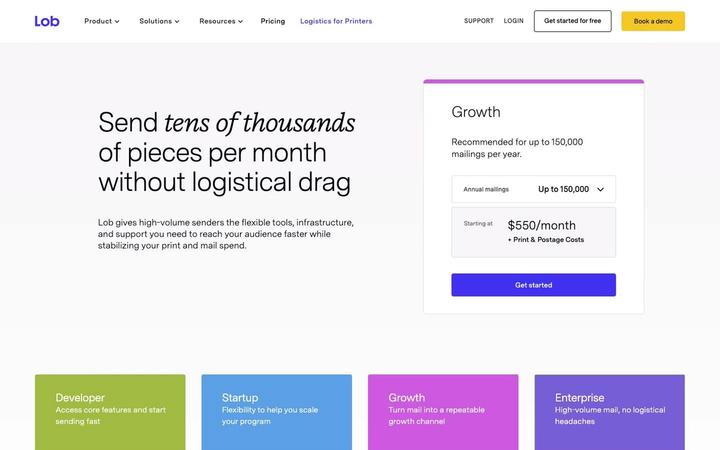
$260/moLob prices direct mail as a two-part bill and says so: a platform subscription from $0 to $550 per month, plus an all-in per-piece rate for print, postage and envelope that falls as the plan rises. A hero volume selector recommends a plan from annual mailings, and per-format rate rows, postcards from $0.905 down to $0.615, let a buyer turn a mail program into a budget.
Mailgun
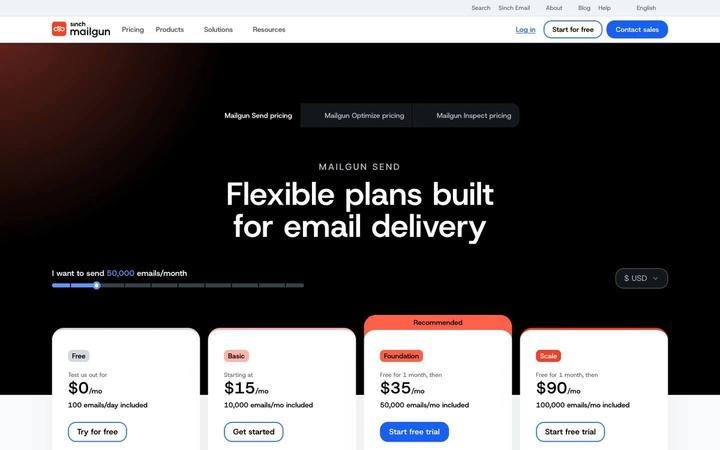
$15/moMailgun sells email sending as prepaid monthly allowances with an overage rate printed on every paid card, falling from $1.80 to $1.30 to $1.10 per 1,000 emails as the commitment rises. A hero slider, 'I want to send 50,000 emails/month', starts the page from volume, and a free month on Foundation and Scale lets a sender try the higher tiers at real volume.

Twilio
$0.0083/segmentTwilio's US SMS page is a rate sheet built in layers under the headline 'SMS and RCS pricing built to break even fast': $0.0083 per segment for SMS on every number type, carrier fees passed through per carrier, and a monthly lease for the number itself. The page says outright that 'Phone number charges are added to your message volume and carrier costs for your total price', and each layer is published down to a $0.001 processing fee keyed to a message's final status, a 'Pricing current as of October 2026' stamp, and a Traffic Optimization Engine 'Starting at $300 /month'.