How Sentry prices

Captured September 18, 2026 at 1440px wide.
Sentry plans and prices
| Plan | Price | Billing |
|---|---|---|
| DeveloperFor solo devs working on small projects | Free | |
| TeamHighlightedEverything to monitor your application as it scales | $26 | /mo |
| BusinessFor teams that need more powerful debugging | $80 | /mo |
| EnterpriseFor organizations with advanced needs | Custom |
As printed on the page captured September 18, 2026.
How does Sentry pricing work?
The value metric is telemetry volume across many meters at once: errors, logs, application metrics, spans, replays, uptime and cron monitors, attachments and two kinds of profiling hours. Each paid plan includes a base quota, '50k errors', '5GB' of logs, '5M spans', '50 replays', and usage above it bills per meter: '+$0.50/GB additional' on logs and metrics, '+$1.00/uptime alert additional', '+$0.78/monitor additional', UI profiling at '+$0.25/hr' and continuous profiling at '+$0.0315/hr'. Errors carry their own volume curve, from '$0.0003625' per error at 50K to 100K down to '$0.0001500' at 20M+. Packaging steps up on team and control: Developer is 'Free' for 'One user', Team adds 'Unlimited users' and integrations, Business adds unlimited dashboards, 'Advanced quota management' and 'SAML + SCIM support', and Enterprise adds a technical account manager. Seer AI Debugger is a separate add-on at '$40/active contributor/month'.
The motion is self-serve through Business, with 'START TRIAL' on the first three cards, and sales-led at Enterprise, where 'CONTACT SALES' opens room for custom quotas and terms. 'Pricing plans for dev teams of all sizes' sits above a Monthly and Annual toggle tagged 'Save with annual'. The cards lead into the Seer band, a '5,000 Session Replays on us' promo, and 'A closer look at each plan', a long table grouped from Monitoring & Troubleshooting through Admin & Compliance and Support. 'Estimate your monthly cost' follows, and 'Fix It' closes the page with 'TRY SENTRY FOR FREE' and 'GET A DEMO'.
Quota plus overage gives an observability bill a predictable floor while letting a traffic spike be priced, and the page pairs it with control: 'Spend notifications' and 'Set maximum spend threshold' appear as plan rows on Team, Business and Enterprise. The step from Team to Business keeps the same base quotas and adds 'Advanced quota management', SAML2, SCIM, BAA and 1,000 metric monitors, so volume is priced by the meters and the tier prices governance. Seer is priced per active contributor, a seat-like unit that ties AI debugging to the people who ship code, kept apart from the telemetry meters. The estimator is the part most worth borrowing: a tab for each meter, its tiered rate table under the slider, and a running receipt with 'ESTIMATED MONTHLY COST' and 'Annual total: $312.00/yr'.
What does Sentry's pricing page do well?
- Quota and overage rate share a cell, as in '5GB +$0.50/GB additional', so the comparison table doubles as a rate card
- The estimator itemizes every meter on a receipt and shows the tiered per-error rates, from '$0.0003625' to '$0.0001500', beneath the slider
- 'Set maximum spend threshold' and 'Spend notifications' are listed as plan features, making the spend cap part of the offer
- Team at '$26/mo' includes 'Unlimited users', which keeps the base plan focused on usage
- The promo states its own terms in one line: 'New users only: Get 5,000 free replays per month for your first 3 months.'
What does Sentry's pricing page reveal about its pricing strategy?
- A blended model: a flat base plan sets the floor, ten usage meters carry the variable bill, and an add-on carries AI
- Error pricing falls across five volume tiers, a curve that rewards a customer for sending more of its traffic to Sentry
- Team and Business share base quotas, so the tier step prices governance features while usage is priced by the meters
- Seer's per-active-contributor price attaches AI value to the people writing code, separate from telemetry volume
- 'Annual and prepaid billing options with additional discounts are available during checkout' points to commitment pricing handled at purchase
Learn with Orb
- ProductSpend controls Set maximum spend threshold and Spend notifications appear as plan features; Orb's spend controls cover the alerts and dashboards that keep usage pricing free of surprise bills.
- ProductExperience Kit The estimator itemizes every meter on a receipt, with tiered per-error rates beneath the slider; Experience Kit builds estimators on one source of pricing truth so customers plan spend.
- GuideAn AI founder's guide to prepaid credits Annual and prepaid billing with additional discounts is offered at checkout; the guide covers how commitments earn a better rate and how usage past a commitment bills at overage.
Questions about Sentry pricing
How much does Sentry cost?
Sentry's pricing starts at $26/mo (Team, annual). The page shows 4 plans, including a free plan, with the top plan priced through sales.
What pricing model does Sentry use?
Sentry prices by usage, combined with flat-rate tiers and per-seat pricing. Buyers can sign up on their own or go through the sales team. Its plans are aimed mainly at developers.
Does Sentry have a free plan?
Yes, Sentry has a free plan, and its paid plans offer a free trial. Paid plans start at $26/mo (Team, annual).
Does Sentry offer an annual discount?
Sentry offers monthly and annual billing; the page doesn't state the discount. The listed prices start at $26/mo (Team, annual). Terms for the plans priced through sales are set with the sales team.
How is Sentry's pricing page laid out?
The page shows 4 plans, highlights Team, and includes a comparison table and a calculator. The breakdown above marks 14 points on it: 6 things it does well and 8 insights into the pricing.
What happens when I go over my Sentry plan quota?
Each Sentry plan includes a base quota, and usage above it is billed at pay-as-you-go rates, so "You only pay for what you use." On Team, errors include "50K/mo included" and then run from "$0.0003625" per error at 50K – 100K down to "$0.0001500" at 20M+. Other meters carry their own rates, such as "+$0.50/GB additional" for logs and application metrics and "+$0.78/monitor additional" for cron monitors.
Which Sentry plans can add the Seer AI Debugger?
Seer AI Debugger is an "Add on to Team, Business, or Enterprise plans" and is priced at "$40/active contributor/month". It covers Root Cause Analysis, Fix Generation, and Error Prediction and Code Review. Seer uses Sentry context to flag breaking changes and automatically root cause issues in production.
Can I set a spending limit on Sentry?
Yes. Sentry lists "Spend notifications" and "Set maximum spend threshold" under Account & Data Management in its plan comparison, on the Team, Business and Enterprise plans. These let a team keep pay-as-you-go usage within a chosen budget. Business also adds "Advanced quota management" for finer control over how quota is used.
From the page as captured September 18, 2026. Current prices are on sentry.io
Chroma
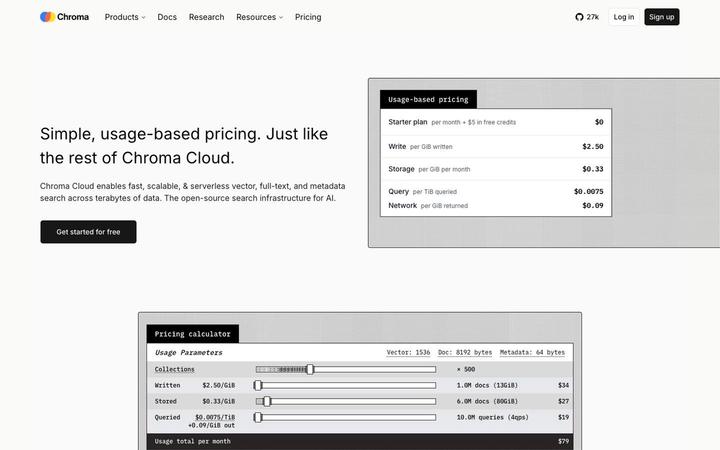
$250/mo + usageChroma prints all four metered rates in the hero, Write at $2.50 per GiB, Storage at $0.33 per GiB per month, Query at $0.0075 per TiB and Network at $0.09 per GiB returned, then hands the reader a calculator that turns documents and queries into a $79 monthly total. Plans sit on top of the meter: Starter at $0 plus usage, Team at $250 a month plus usage with $100 in credits, and Enterprise on custom terms.
Confluent
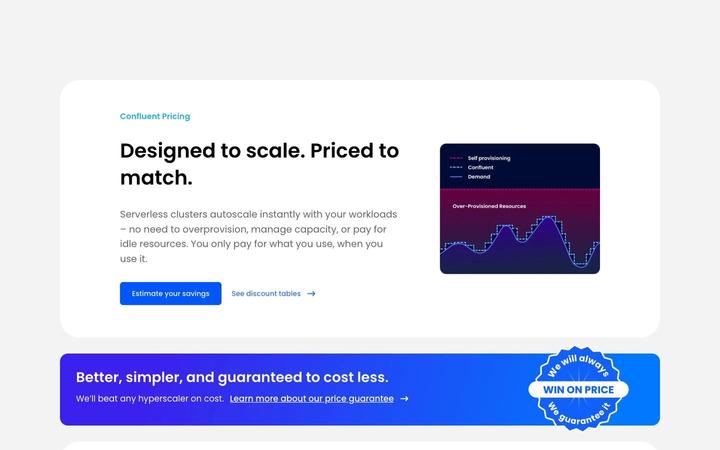
~$385/moConfluent prices serverless Kafka on a composite meter, eCKU-hours plus data in and out per GB plus storage per GB-month, and closes its rate table with an 'Estimated Monthly Starting Cost' of $0, $385, $895 and $2,300 that turns an hourly unit into a budget number. Behind it sit two discount structures and an annual commitment that can be spent across the whole Confluent Cloud stack.

Datadog
$15/host/moDatadog publishes a rate card per product, with every billable SKU listed in a left-hand navigator from AI Credits to Workflow Automation. Infrastructure Monitoring prices per host across three host levels: Basic, set with sales, beside Pro starting at $ 15 and Enterprise at $ 23 billed annually, with on-demand rates printed beside them and allotments of containers, custom metrics and custom events attached to each paid host. The bill is the sum of the products a customer adopts, and Basic hosts let one account price noncritical workloads at their own level.
Fly.io
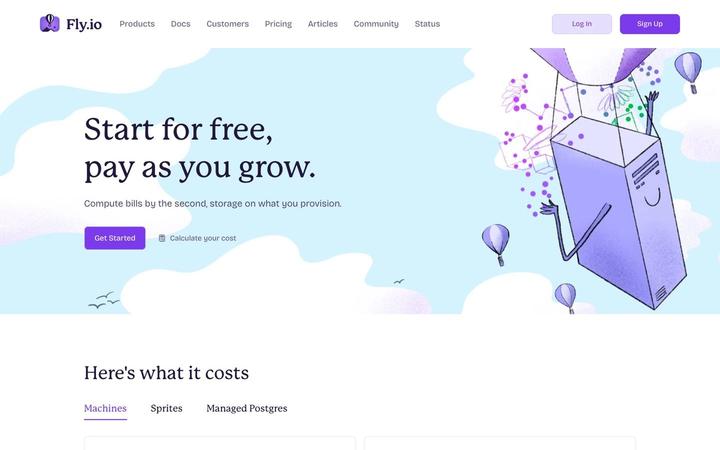
From $0.0030/hr (shared-cpu-1x, 256MB)Fly.io prices raw infrastructure: Machines 'Billed by the second while a Machine runs', volumes on provisioned capacity, and egress by region, with prices set per region through a selector. Support is sold as its own ladder at '$29 / mo', '$199 / mo' and 'From $2,500 / mo', compliance is a '$99/mo' add-on, and a Custom plan covers committed spend and volume discounts.
Grafana
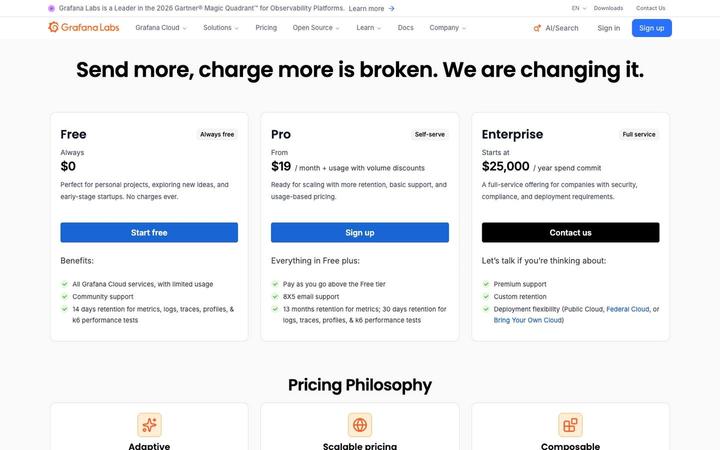
$19/moGrafana Cloud prices on a $19 per month platform fee that carries an allowance on every product, then a usage meter chosen per product, with volume tiers that lower the marginal rate as a customer grows. The hero states the thesis, 'Send more, charge more is broken. We are changing it.', and the page backs it with an embedded calculator that draws the tier curve and a cost-reduction band under the rates. Enterprise prints its entry point: 'Starts at $25,000 / year spend commit'.

Modal
$250 + compute/moModal bills GPU, CPU, memory and storage by the second or month, and network egress at '$0.04 / GiB', with the full rate card under the promise of paying for 'just actual compute time, by the CPU cycle'. Plans are a platform fee plus that usage: Starter at $0 with $30 of monthly credits and 1 TiB of egress, Team at $250 with $100 and 10 TiB, and a custom Enterprise with 100 TiB. A worked comparison makes the serverless case on utilization, with a $3.95 GPU-hour that totals '12% lower cost' than $3 GPU-hours provisioned around the clock.