
Captured September 18, 2026 at 1440px wide. The page continues below the crop (9,162px in total).
Figma plans and prices
| Plan | Price | Billing |
|---|---|---|
| StarterFree limited access to Figma products | Free | |
| Professional | $16 | /mo |
| Organization | $55 | /mo |
| Enterprise | $90 | /mo |
As printed on the page captured September 18, 2026.
How does Figma pricing work?
The headline, "Pick your plan, choose your seats", states the model: the plan sets the organizational capabilities and the seat type sets what each person can do. Professional lists a Full seat at $16/mo, a Dev seat at $12/mo and a Collab seat at $3/mo; Organization lists $55, $25 and $5; Enterprise lists $90, $35 and $5. A strip of product icons under each seat shows which of nine products it opens, from Figma Design and Dev Mode to FigJam, Slides and Buzz, and each seat line adds an AI credit allotment, +3,000 AI credits/mo on a Professional Full seat rising to +4,250 on Enterprise, with 500 on every Dev and Collab seat. Role-based seats fit a product used by designers, developers and stakeholders at very different intensity, and viewers who comment cost nothing, which keeps the product spreading through every team that touches a file.
The motion is hybrid. Starter, Professional and Organization end in Select plan, Enterprise ends in Contact sales, and Enterprise prices are printed, so the conversation is a procurement step with the numbers already known. Professional carries a Monthly / Annual toggle, and Organization and Enterprise read "Billed annually". Each card describes its buyer in a "Choose Professional if you:" list, from a professional working solo to a business designing for multiple products or brands. The page runs from the hero and the product chip row through the plan matrix, a note on free viewers and betas, an Add-ons section for AI credits and Governance+, Compare all features with a seat filter and a key-features toggle, Pricing FAQs, and a TRUSTED BY TEAMS AT logo band with Slack, The New York Times, Zoom, Airbnb and Coinbase.
Under the hood, three layers stack. Seats are the base fee and the packaging unit, since products are bundled into seat types and the FAQ confirms products are bought through a plan and seats. AI credits are a credit pool attached to each seat, shared across all Figma AI features, with additional credits bought for the whole team to share through pay-as-you-go or a subscription, an included allowance with metered usage beyond it. Governance+ sits on top as an Enterprise add-on priced in conversation. The FAQ shows the billing mechanics by plan: on Professional, seats added during an annual term are billed monthly at the monthly price and prorated, while Organization and Enterprise invoice approved seats quarterly with prorated pricing to the end of the annual term. Worth borrowing: a seat-by-plan matrix with every cell priced lets a company budget a mixed team before the first call.
What does Figma's pricing page do well?
- Every price is printed, including Enterprise Full seat $90/mo, Dev seat $35/mo and Collab seat $5/mo, so Contact sales is a procurement step with the numbers already known
- Product icon strips under each seat type show at a glance which of nine products a Full, Dev or Collab seat opens
- "Choose Professional if you:" bullets on each card describe the buyer, which drives self-selection without a quiz
- Compare all features has a SEAT dropdown and an All features / Key features toggle, so a Dev seat buyer compares only what applies to them
- The FAQ answers "What happens if I add seats mid-year on an annual plan?" with plan-specific proration and invoicing rules, the question finance asks before signing
What does Figma's pricing page reveal about its pricing strategy?
- The seat is the packaging unit: products are bundled into Full, Dev and Collab seats, so each new product adds value to a seat
- AI credits form a pool attached to each seat, with a shared team top-up through pay-as-you-go or a subscription
- The price step from Professional to Organization sits on the Full seat, $16 to $55, while Collab moves from $3 to $5, so light users stay inexpensive at every level
- Free view and comment access on paid plans lets a file reach every stakeholder, a land-and-expand path that monetizes the people who edit
- A Monthly / Annual choice on Professional and "Billed annually" on Organization and Enterprise separate self-serve terms from contract terms
Learn with Orb
- ProductPrepaid credits Each seat carries a monthly AI credit allotment, from 500 on Dev and Collab seats to 4,250 on an Enterprise Full seat; Orb's prepaid credits product covers plans built on credit allocations.
- DocsPricing an AI agent AI credits arrive as a monthly grant per seat with a shared team top-up through pay-as-you-go or a subscription, the grant and top-up pattern in Orb's worked example of token-based pricing.
- GuideBuild a pricing and packaging strategy in 9 steps Pick your plan, choose your seats sets four plans against Full, Dev and Collab seats, with Choose Professional if you bullets; Orb's nine steps cover who each plan is for and what separates them.
Questions about Figma pricing
How much does Figma cost?
Figma's pricing starts at $3/seat/mo. The page shows 4 plans, including a free plan, with the top plan priced through sales.
What pricing model does Figma use?
Figma prices per seat, combined with credits. Buyers can sign up on their own or go through the sales team. Its plans are aimed mainly at mid-market companies.
Does Figma have a free plan?
Yes, Figma has a free plan. Paid plans start at $3/seat/mo.
Does Figma offer an annual discount?
Figma offers monthly and annual billing; the page doesn't state the discount. The listed prices start at $3/seat/mo. Terms for the plans priced through sales are set with the sales team.
How is Figma's pricing page laid out?
The page shows 4 plans and includes a comparison table and an FAQ. The breakdown above marks 14 points on it: 7 things it does well and 7 insights into the pricing.
How many AI credits come with each Figma seat?
Every Figma seat includes a monthly allotment of AI credits that is shared across all Figma AI features and products. Full seats include 3,000 credits/month on Professional, 3,500 on Organization and 4,250 on Enterprise, while Collab, Dev and View seats and Starter users receive 500 credits/month. Teams that want more can purchase additional AI credits for the whole team to share, through pay-as-you-go or a subscription.
What happens if I add Figma seats mid-year on an annual plan?
On Professional, new paid seats added during the annual term are billed as a separate monthly subscription at the monthly price, prorated from the day an admin approves them. Those seats stay on monthly invoices until they are added to the annual subscription or removed. On Organization and Enterprise, admins approve new seats, which are billed with prorated pricing to the end of the annual subscription term and invoiced quarterly.
What is the difference between Figma Full, Dev and Collab seats?
The Full seat includes full access to all Figma products, from Figma Design and Figma Make to Dev Mode, FigJam, Figma Slides and Figma Buzz, at $16/mo on Professional. The Dev seat, at $12/mo on Professional, gives full access to Dev Mode, FigJam, Figma Slides and Figma Buzz plus view and comment access in Figma Design files. The Collab seat, at $3/mo on Professional, covers FigJam, Figma Slides and Figma Buzz with view and comment access in Design files and basic inspection in Dev Mode. On any paid plan, others can view and comment on files without purchasing extra seats.
From the page as captured September 18, 2026. Current prices are on figma.com
Canva
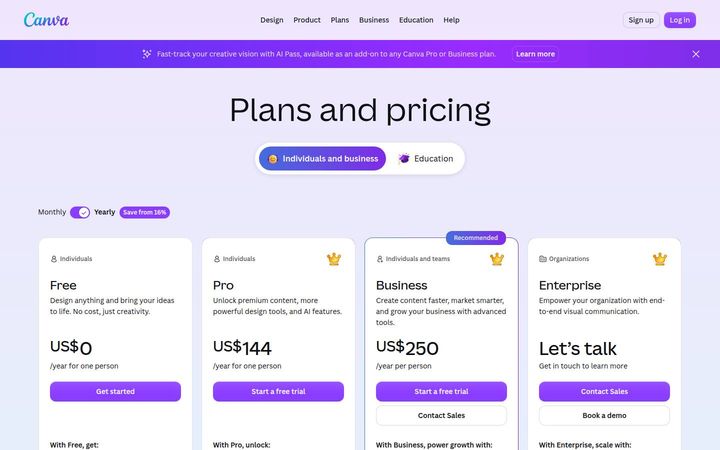
US$144/person/yrCanva sells a seat ladder, Free, Pro at US$144 a year for one person, Business at US$250 a year per person and Enterprise on 'Let’s talk', and inside every seat sits a shared AI allowance. Allowances are stated as multiples, 10x and 20x more AI than Canva Free, and a footnote explains that Standard, Premium and Ultra AI tools draw on the pool at different rates, a credit system running behind a seat price.

Descript
$16/person/moDescript prices per person and attaches two monthly allowances to every seat, media hours and AI credits: Hobbyist at $16 with '10 media hours / month' and '400 AI credits / month', Creator at $24 with 30 and 800, Business at $50 with 40 and 1500, on annual billing. Each paid plan also caps team size, and Enterprise is 'Custom', with 'AI credits and media hours: sized to your team'.

Framer
$10/moFramer sells a flat site subscription at $0, $10 and $30 a month and Custom, and layers a monthly AI credit allowance that the buyer picks from a dropdown inside each paid card, with '2× credits first month' on both paid plans. Its comparison table prints overage rates and hard ceilings together, such as '150 then $20 per 100 (700 max)' for pages, so a buyer can model both the next increment and the worst case.