How Canva prices
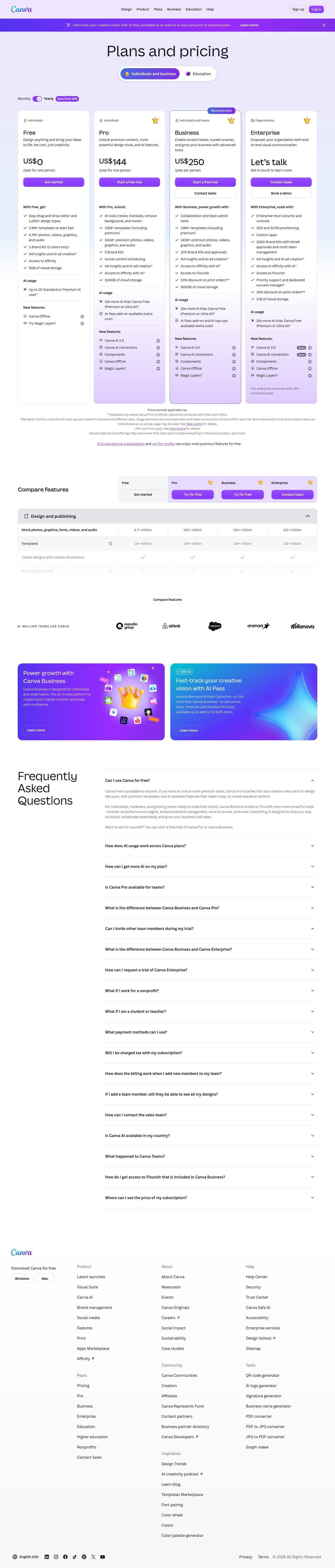
Captured October 26, 2026 at 1440px wide.
Canva plans and prices
| Plan | Price | Billing |
|---|---|---|
| FreeDesign anything and bring your ideas to life. | US$ 0 | /year for one person |
| ProUnlock premium content, more powerful design tools, and AI features. | US$ 144 | /year for one person |
| BusinessHighlightedCreate content faster, market smarter, and grow your business with advanced tools. | US$ 250 | /year per person |
| EnterpriseEmpower your organization with end-to-end visual communication. | Let’s talk |
As printed on the page captured October 26, 2026.
How does Canva pricing work?
The value metric is the person, priced per year: US$0 for Free, 'US$ 144 /year for one person' for Pro, 'US$ 250 /year per person' for Business, and Enterprise on request. Each card stacks a feature list, an AI usage block and a New features block. AI is metered inside the seat: Free gets 'Up to 20 Standard or Premium AI uses', Pro gets '10x more AI than Canva Free', Business and Enterprise get 20x, and the AI Pass add-on offers '40x more AI than Canva Pro'. Plans separate on scale of brand and team: 1 Brand Kit on Free, 5 on Pro, 100 with approvals on Business and 1000 with tiered approvals on Enterprise, alongside storage from 5GB to 1TB.
The motion runs from self-serve to sales. Pro and Business both offer 'Start a free trial', Business adds 'Contact Sales', and Enterprise offers 'Contact Sales' and 'Book a demo', with priority support and a dedicated success manager for customers with 150+ contracted seats. The page opens on a banner for AI Pass, then 'Plans and pricing' with an Individuals and business / Education tab pair and a Monthly / Yearly switch marked 'Save from 16%'. Audience labels sit above each plan name, Business carries 'Recommended', and a comparison table with CTAs in its header, previewed with a Compare features button to expand it, leads to a '6+ MILLION TEAMS USE CANVA' logo band, promo tiles for Business and AI Pass, and an 18-question FAQ.
Under the hood, the AI block is a credit pool attached to each seat. The footnote says it plainly: 'Standard, Premium, and Ultra AI tools use your shared AI allowance at different rates.' That points to a rate table behind the allowance, where each class of AI tool draws a different amount. Expressing the allowance as multiples of the free plan keeps the card simple while the underlying rates can change as models do, and Business adds 'AI Pass add-on and AI top-ups available (extra cost)', a route for heavy users to buy more. A seat price with an AI pool inside it, plus paid expansion on top, is where creative tools are heading, and Canva shows the whole structure on one page.
What does Canva's pricing page do well?
- A Recommended badge and elevated card on Business give the four-card row a clear default
- 'Start a free trial' on both Pro and Business, with Business also offering 'Contact Sales', matches the CTA to how each segment buys
- Audience labels above each plan name, Individuals, Individuals and teams, and Organizations, let buyers self-select before reading features
- The comparison table keeps a CTA per column in its header, so the buyer can act from the table
- The Education tab and the line on K-12 educational organizations and not-for-profits put free-access programs on the main pricing page
What does Canva's pricing page reveal about its pricing strategy?
- A shared AI allowance sits inside every seat, a credit pool drawn at different rates by Standard, Premium and Ultra AI tools
- Allowances are stated as multiples of Free, which keeps the card readable while the rates behind the pool can evolve
- AI Pass and AI top-ups give heavy users paid expansion on top of the seat, a land-and-expand path built on AI usage
- Brand Kits scale from 1 to 5 to 100 to 1000, marking each step from individual to organization
- Dedicated success management attaches to 150+ contracted seats, which sets where Enterprise service begins
Learn with Orb
- GuideCanva pricing plans and cost breakdown for 2025 Orb's buyer guide to Canva's plans and costs. This page covers how the pricing page presents them.
- ProductPrepaid credits A shared AI allowance inside each seat is drawn at different rates by Standard, Premium and Ultra tools; Orb's page covers how credit rates and the credit model shape where value is captured.
- ProductPrice evolution Allowances stated as multiples of Free keep the cards stable while the rates behind the pool move with models; Orb's price evolution covers rolling out changes customers can plan around.
Questions about Canva pricing
How much does Canva cost?
Canva's pricing starts at US$144/person/yr. The page shows 4 plans, including a free plan, with the top plan priced through sales. Paying annually saves at least 16%.
What pricing model does Canva use?
Canva prices per seat, combined with credits. Buyers can sign up on their own or go through the sales team. Its plans are aimed mainly at individuals and prosumers.
Does Canva have a free plan?
Yes, Canva has a free plan, and its paid plans offer a free trial. Paid plans start at US$144/person/yr.
Does Canva offer an annual discount?
Yes, paying annually saves at least 16%. A toggle on the page switches between monthly and annual prices. The listed prices start at US$144/person/yr. Terms for the plans priced through sales are set with the sales team.
How is Canva's pricing page laid out?
The page shows 4 plans, highlights Business, and includes a comparison table and an FAQ. The breakdown above marks 14 points on it: 6 things it does well and 8 insights into the pricing.
How does the AI allowance work on Canva plans?
Every Canva plan includes a shared AI allowance. Free includes "Up to 20 Standard or Premium AI uses", Pro offers "10x more AI than Canva Free (Premium or Ultra AI)", and Business and Enterprise each offer "20x more AI than Canva Free (Premium or Ultra AI)". The page notes: "Standard, Premium, and Ultra AI tools use your shared AI allowance at different rates." More advanced AI tools and complex tasks use more of the allowance.
What is Canva AI Pass and how do I get more AI on Canva?
AI Pass is an add-on available on Canva Pro and Business plans that unlocks "40x more AI than Canva Pro - or 20x more than Canva Business". It can be used across Ultra, Premium and Standard AI tools. Business also lists "AI Pass add-on and AI top-ups available (extra cost)", which gives heavier users another way to expand their AI usage.
Is Canva free for nonprofits and K-12 schools?
Yes. The pricing page states that "K-12 educational organizations and not-for-profits can enjoy most premium features for free." The page also has a dedicated Education tab next to Individuals and business, plus Education, Higher education and Nonprofits links that cover these programs.
From the page as captured October 26, 2026. Current prices are on canva.com

Descript
$16/person/moDescript prices per person and attaches two monthly allowances to every seat, media hours and AI credits: Hobbyist at $16 with '10 media hours / month' and '400 AI credits / month', Creator at $24 with 30 and 800, Business at $50 with 40 and 1500, on annual billing. Each paid plan also caps team size, and Enterprise is 'Custom', with 'AI credits and media hours: sized to your team'.

Figma
$3/seat/moFigma prices a matrix: four plans, Starter, Professional, Organization and Enterprise, by three seat types, Full, Dev and Collab, with every price printed down to Enterprise at $90/mo for a Full seat. Each seat carries a monthly allotment of AI credits, which makes a credit pool attached to each seat the second layer of the model.

Framer
$10/moFramer sells a flat site subscription at $0, $10 and $30 a month and Custom, and layers a monthly AI credit allowance that the buyer picks from a dropdown inside each paid card, with '2× credits first month' on both paid plans. Its comparison table prints overage rates and hard ceilings together, such as '150 then $20 per 100 (700 max)' for pages, so a buyer can model both the next increment and the worst case.