How Ramp prices

Captured October 26, 2026 at 1440px wide. The page continues below the crop (12,304px in total).
Ramp plans and prices
| Plan | Price | Billing |
|---|---|---|
| FreeBest for smaller teams who want to simplify finances. | $0 | /mo/user |
| PlusHighlightedPerfect for teams who want to use AI-driven automation to eliminate busywork. | $15 | /mo/user + Platform fee based on team size |
| EnterpriseSpecifically made for teams who need full customization. | Custom | Annual billing |
As printed on the page captured October 26, 2026.
How does Ramp pricing work?
The value metric is the user, priced at '$0/mo/user' on Free and '$15/mo/user' on Plus, with '+ Platform fee based on team size' stacked on Plus and a small set of true unit charges in the matrix, such as '1099 filing (NEC and MISC)' at '$.65 per IRS filing. Free state filing.' Seats track the employees who carry cards and approve spend, and the platform fee scales with the organization around them. Packaging climbs by automation: AI-assisted Free, AI-powered Plus and AI-tailored Enterprise, with Plus adding AI-driven expense reviews, auto-coded line items and NetSuite and Sage Intacct integrations, and Enterprise adding Workday and Oracle Fusion Cloud, local currency card issuing in 30+ countries and implementation services. Two modules sit beside the plans: Procurement as an 'Add-on to Plus or Enterprise', and an 'Accounts Receivable Add-on' that carries revenue recognition and recurring billing schedules on every plan.
'Start for free. Scale with Intelligence.' names both motions, and the subhead addresses 'a startup, global enterprise, or somewhere in between'. Every card carries a 'What's your work email?' field above its button, 'Get started for free' on Free and Plus and 'Contact sales' on Enterprise, so the first step is the same on every plan. Plus takes the yellow border, the filled yellow button and 'Save 20% with annual billing'. 'View all features' on each card leads to Compare Features, a matrix from Corporate Card to Support with plan names and buttons in its header. '85,000+ finance teams have saved millions of hours with Ramp.' sits between the cards and the table, and a four-question FAQ closes the page.
Under the hood, the Free tier is a full product: unlimited cards, OCR invoice capture, bill pay by ACH, card, check and wire, invoicing and cash application on the receivables side, and Banking accounts earning 2% and 4.61%. That points to revenue earned on card spend, payment flows and cash balances alongside the subscription, which is what lets the entry plan cost nothing. The FAQ makes the loop explicit: 'You can pay for Ramp Plus with ACH or the rewards you earn from your Ramp card spending.' Plus carries a seat price and a platform fee, a two-part tariff that lets small teams start low while larger organizations contribute through the fee, and Enterprise is 'Custom' on 'Annual billing', where implementation, ERP extensions and support are scoped per deal. The Accounts Receivable rows split the module in two: collecting payments is included on every plan, while revenue recognition and recurring billing schedules form a separate add-on. Worth borrowing: publish a free tier strong enough that the paid plans sell automation, and package the deepest workflows as modules a buyer can attach to any plan.
What does Ramp's pricing page do well?
- The Free column is a working product: unlimited physical and virtual cards, OCR invoice capture, bill pay by ACH, card, check and wire, receivables with cash application, and banking yield at $0/mo/user
- Comparison cells carry qualifying text, such as '24/7 chat support' against '24/7 phone support', named accounting integrations per tier, and 'Requires Accounts Receivable Add-on' on add-on rows
- The plan names and their buttons sit in the Compare Features header, so a buyer can act from any section of the matrix
- Banking rates are printed as numbers, 2% and 4.61%, with footnote markers that resolve to disclosures in the footer
- Each card ends with 'View all features', keeping the cards short while giving detail-driven buyers a direct route to the matrix
What does Ramp's pricing page reveal about its pricing strategy?
- A two-part tariff on Plus: '$15/mo/user' plus a 'Platform fee based on team size', with seats and organization size priced separately
- A full free tier, now including payment acceptance on the receivables side, points to revenue from card spend, payment flows and cash balances alongside the subscription
- Plus can be paid with Ramp card rewards, which ties the subscription to card usage
- Two add-on modules with different reach: Procurement attaches to Plus or Enterprise, while the Accounts Receivable Add-on is marked on all three plans
- Plan badges name the level of AI in each plan, AI-assisted, AI-powered and AI-tailored, which makes automation the axis of the upgrade
Learn with Orb
- ProductPrice modeling Plus combines $15 per user with a platform fee based on team size, a two-part tariff; Orb's price modeling covers hybrid plans like this and changing them without re-engineering billing.
- Guide8 SaaS pricing best practices with concrete examples The Free column carries unlimited cards, bill pay and treasury yield at $0 per user; Orb's best practices cover free plans generous enough to attract users and limited enough to prompt an upgrade.
- GuideBuild a pricing and packaging strategy in 9 steps Badges reading AI-assisted, AI-powered and AI-tailored make automation the axis of each upgrade; Orb's nine-step guide covers what separates the plans and how the lineup scales with the customer.
Questions about Ramp pricing
How much does Ramp cost?
Ramp's pricing starts at $15/seat/mo. The page shows 3 plans, including a free plan, with the top plan priced through sales. Paying annually saves 20%.
What pricing model does Ramp use?
Ramp prices with flat-rate tiers, combined with per-seat pricing and usage-based pricing. Buyers can sign up on their own or go through the sales team. Its plans are aimed mainly at mid-market companies.
Does Ramp have a free plan?
Yes, Ramp has a free plan, and its paid plans offer a free trial. Paid plans start at $15/seat/mo.
Does Ramp offer an annual discount?
Yes, paying annually saves 20%. The listed prices start at $15/seat/mo. Terms for the plans priced through sales are set with the sales team.
How is Ramp's pricing page laid out?
The page shows 3 plans, highlights Plus, and includes a comparison table and an FAQ. The breakdown above marks 14 points on it: 7 things it does well and 7 insights into the pricing.
How much does Ramp charge for 1099 filing?
Ramp lists "1099 filing (NEC and MISC)" in its Accounts Payable features at "$.65 per IRS filing. Free state filing." The same rate appears on the Free, Plus and Enterprise plans. Ramp also includes 1099 reporting under Budgets & Reporting and W8 uploads for tax management on Plus and Enterprise.
Can I pay for Ramp Plus with my Ramp card rewards?
Yes. Ramp's FAQ states, "You can pay for Ramp Plus with ACH or the rewards you earn from your Ramp card spending." Plus is listed at $15/mo/user plus a platform fee based on team size, and Ramp offers a free 30-day trial of Plus. You can upgrade or downgrade anytime within your Ramp dashboard or by contacting Ramp directly.
What add-ons does Ramp offer on its pricing page?
Ramp offers two add-on modules. Procurement is an "Add-on to Plus or Enterprise" that covers custom intake, an advanced workflow builder, purchase order management, AI-driven vendor compliance reviews and three-way match with Ramp purchase orders. The Accounts Receivable Add-on adds automated revenue recognition schedules and recurring billing schedules, and it is marked on all three plans. Core receivables features such as invoice creation, cash application and accepting payments via ACH, card and check are included on every plan.
From the page as captured October 26, 2026. Current prices are on ramp.com
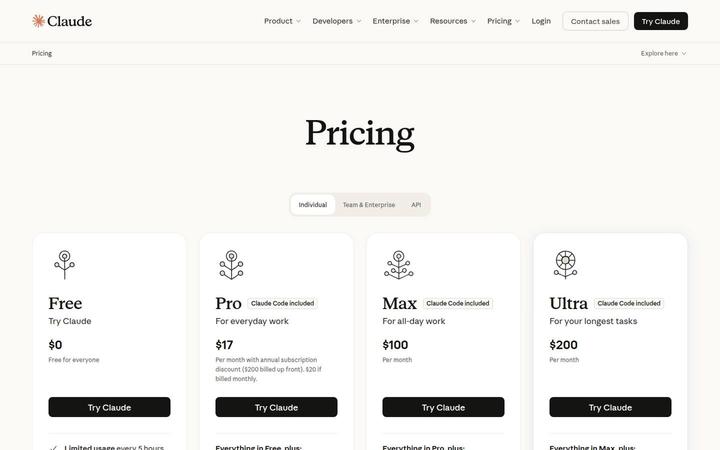
Anthropic (Claude)
$17/moClaude sells four individual plans, Free, Pro at $17 a month on annual, Max at $100 and Ultra at $200, and what separates them is usage itself. Max is 5x Pro in both the five-hour and weekly windows, Ultra is 10x Pro weekly with no 5-hour limit for verified accounts, and both top plans carry a monthly API credit. One URL carries individual, team and API pricing, and the FAQ prints the enterprise rate.
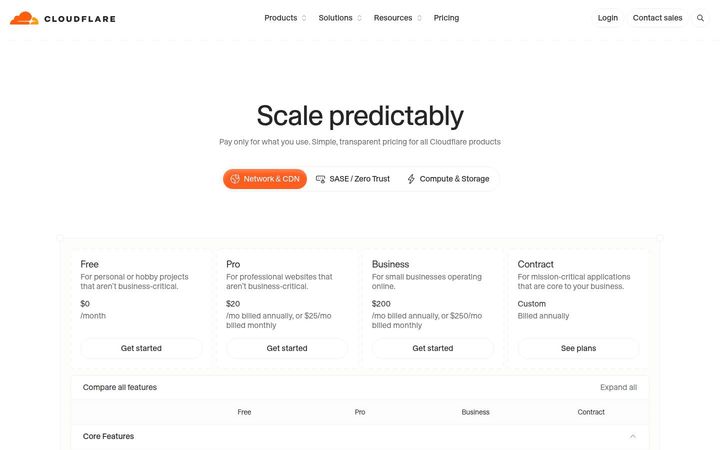
Cloudflare
$20/moCloudflare runs three pricing models on one page, each behind its own tab: flat site plans at $0, $20, $200 and Custom for Network & CDN, $7 /user/month for SASE / Zero Trust, and a metered rate card with free allowances for the Compute & Storage primitives, now including Basin's per-stage data rates. Each business line gets the value metric that fits its cost, and the default tab prints both billing cadences on every card.

Webflow
$15/site/moWebflow prices per site: Starter is free, Basic is $15/mo and Premium $25/mo billed yearly, and Platform plans begin with Team at $2,500/mo on an annual contract before a custom Enterprise. Premium carries a bandwidth dropdown from 50 GB to 2.5 TB, and the add-ons are metered on their own units, page views, sessions and locales, so traffic and reach set the bill alongside the plan.