How Slack prices

Captured November 2, 2026 at 1440px wide.
Slack plans and prices
| Plan | Price | Billing |
|---|---|---|
| FreeA simpler way to chat and collaborate | $0 | USD free forever |
| ProDrive productivity in one place | $8.75 | USD per user / month, when paying monthly |
| Business+HighlightedScale with AI-powered work | $18 | USD per user / month, when paying monthly |
| Enterprise+Maximize performance on the most comprehensive work OS | — | Contact sales for pricing |
As printed on the page captured November 2, 2026.
How does Slack pricing work?
The value metric is the seat, priced per user per month, which suits a messaging product whose value grows with every person in the workspace. Free is '$0 USD free forever' with '90 days of message history', 'Up to 10 apps' and 1:1 meetings. Pro removes those limits at $8.75, Business+ at $18 adds 'Advanced AI' and SAML-based single sign-on, and Enterprise+ adds 'Enterprise-Grade AI', 'Enterprise search', 'Multiple SAML configurations' and access to 'Frontline teams (add-on)'. Every card lists the same rows, with the features a plan does not include shown in grey, so each card doubles as a map of the next upgrade.
The hero speaks to both kinds of buyer at once: 'Choose a paid plan built for businesses.' then 'Or start with the basics for free, and upgrade at any time.' A logo strip introduced by 'leading businesses rely on Slack' sits above the cards. Business+ carries a 'BEST VALUE' badge, Pro and Business+ both lead with '50% OFF FOR 3 MONTHS*', and Enterprise+ reads 'Contact sales for pricing' above a CONTACT SALES button. The page continues into an eight-category comparison table with CTAs at its head, closing with a Success Plans section, then security and GovSlack panels, an FAQ, and a closing band with GET STARTED and TALK TO SALES.
Under the hood, Slack is packaging AI as the upgrade lever. Each band names a level of AI, and features such as Slackbot, AI search and AI workflow generation move between tiers, so the seat price carries AI value without a separate meter. The printed ladder runs $0 to $8.75 to $18 across the self-serve plans, and Enterprise+ is priced in a conversation about commitments, volume and timing. Around the seat sit separately sold layers: 'Slack Enterprise Key Management', 'Add your frontline teams', and three Success Plans, where 'Standard Success Plan' comes with every paid plan, 'Premier Success Plan' is an 'Add-on' on Pro and included from Business+, and 'Signature Success Plan' is an 'Add-on' on all three. That points to support priced as its own product line beside the seat, a pattern worth borrowing for any team selling service levels to enterprise buyers. The FAQ covers the seat mechanics a buyer of per-user software asks about: paying for accounts that are not actively used, how new users are billed, and paying by invoice or card.
What does Slack's pricing page do well?
- Business+ carries the 'BEST VALUE' badge, an outlined card and the filled CTA, so one recommended plan stands out in a row of four
- Every card lists the full feature ladder with excluded rows in grey, so a Free or Pro buyer sees exactly what the next tier unlocks
- The Success Plans rows map support by plan, with each cell reading included or 'Add-on', so a buyer sees which service level comes with the seat and which is bought on top
- '*Terms apply' sits directly under the plan row, keeping the promo terms one click from the offer
- GET STARTED with TALK TO SALES in the nav and again in the closing band give self-serve and assisted buyers a next step at both ends of the page
What does Slack's pricing page reveal about its pricing strategy?
- AI depth, more than seat count, separates the plans: the price per user carries AI value, and Slackbot moves into paid tiers as an upgrade reason
- A three-month 50% launch offer on both paid plans lowers the cost of the first quarter, when a team is still deciding whether Slack becomes its default
- Enterprise+ reads 'Contact sales for pricing', so the top plan is priced deal by deal, giving the sales team room on commitments, volume pricing and timing
- Success Plans turn support into a three-level catalog of its own, which points to service revenue billed beside the seat at the Premier and Signature levels
- 'Frontline teams (add-on)' appears on every card and unlocks on Enterprise+, which points to a second seat type for frontline staff sold beside the core seat
Learn with Orb
- GuideBuild a pricing and packaging strategy in 9 steps Basic AI, Advanced AI and Enterprise-Grade AI give each paid plan a named AI band; Orb's nine-step guide covers what separates the plans and how the lineup scales with the customer.
- GuideAn expert's guide to enterprise pricing for SaaS Enterprise+ is sold through sales on governance, with data residency, legal holds and the Discovery API; Orb's enterprise guide covers how enterprise pricing differs from SMB pricing.
Questions about Slack pricing
How much does Slack cost?
Slack's pricing starts at $8.75/user/mo. The page shows 4 plans, including a free plan, with the top plan priced through sales.
What pricing model does Slack use?
Slack prices per seat. Buyers can sign up on their own or go through the sales team. Its plans are aimed mainly at small businesses.
Does Slack have a free plan?
Yes, Slack has a free plan. Paid plans start at $8.75/user/mo.
Does Slack offer an annual discount?
Slack's pricing page shows a single billing period. The listed prices start at $8.75/user/mo. Terms for the plans priced through sales are set with the sales team.
How is Slack's pricing page laid out?
The page shows 4 plans, highlights Business+, and includes a comparison table and an FAQ. The breakdown above marks 14 points on it: 7 things it does well and 7 insights into the pricing.
How does the Slack 50% off for 3 months offer work?
Slack's Pro and Business+ cards both carry a "50% OFF FOR 3 MONTHS*" label. Pro drops from $8.75 to $4.38 USD per user / month, and Business+ drops from $18 to $9 USD per user / month, both shown for paying monthly. The offer is marked "*Terms apply" on the page.
What are Slack Success Plans?
Success Plans are the support levels listed at the end of Slack's comparison table. "Standard Success Plan" is included on Pro, Business+ and Enterprise+. "Premier Success Plan" is an Add-on on Pro and included on Business+ and Enterprise+, while "Signature Success Plan" is an Add-on on all three paid plans.
What add-ons does Slack offer on its pricing page?
Beyond the Success Plans, Slack lists two add-ons in its comparison table. "Add your frontline teams" is marked NEW and Add-on under Enterprise+, and the Enterprise+ card shows "Frontline teams (add-on)" with a NEW tag. In the Security section, "Slack Enterprise Key Management" also appears as an Add-on on Enterprise+.
From the page as captured November 2, 2026. Current prices are on slack.com
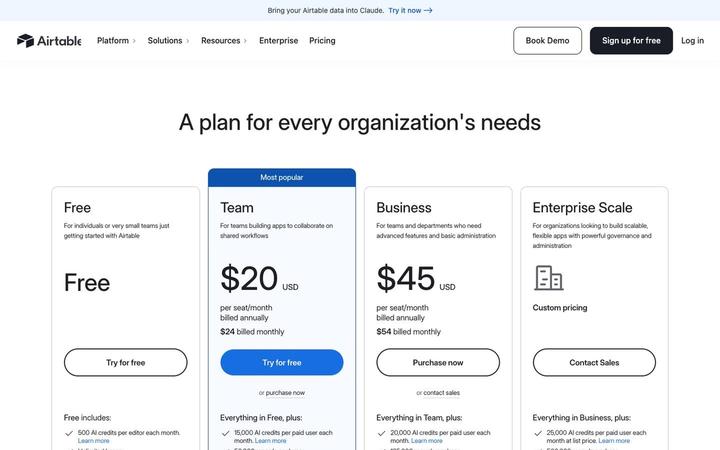
Airtable
$20/seat/moAirtable prices four plans per seat, Free, Team at $20, Business at $45 and Enterprise Scale on custom pricing, and attaches a monthly pool of AI credits to every seat. Credits are the first bullet on each card and step from 500 per editor on Free to 25,000 per paid user, with top-up packs priced in the table. Annual and monthly prices print together on each card, so the commitment discount is visible at a glance.
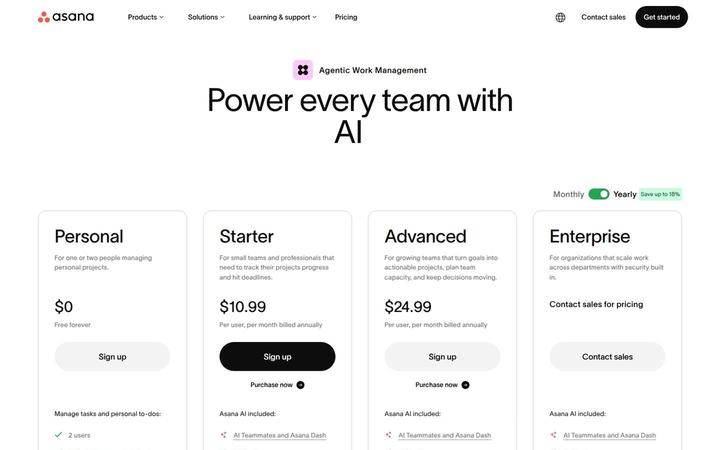
Asana
$10.99/user/moAsana pairs a per-user ladder, Personal at $0, Starter at $10.99, Advanced at $24.99 and Enterprise through sales, with a metered AI layer priced in the open. Each paid plan includes a pool of AI requests, and more cost $0.50 each in prepaid usage packs or $0.60 each pay as you go, under the banner 'One flat rate for every AI request'. Seats price the work management product, requests price the work AI Teammates and Asana Dash do, and optional modules such as Timesheets and Budgets extend down to Starter.

Calendly
$10/seat/moCalendly sells four plans, Free, Standard at $10/seat/mo, Teams at $16/seat/mo and Enterprise from $15k a year with a 50-seat floor, and it defines a seat on every paid card: hosts need one, invitees do not. The page leads with its AI add-on, Notetaker and Callie, sold as a switch inside the Standard and Teams cards, which shows a scheduling tool growing into a seat price plus an AI layer.

ClickUp
$9/seat/moClickUp prices on seats with AI built into every plan: Free Forever at $0, Core at $9 and Business at $17 per 'user / mo · billed yearly' against struck regular prices, Enterprise at 'Custom', and a MAX plan at $100. Each tier carries its own pooled credit allowance, with top-ups at '$10 per 10K credits', framed by a '100% Money-back Guarantee', a written 'SUPER FAIR BILLING POLICY' and a savings calculator that ends in 'Get a quote'.
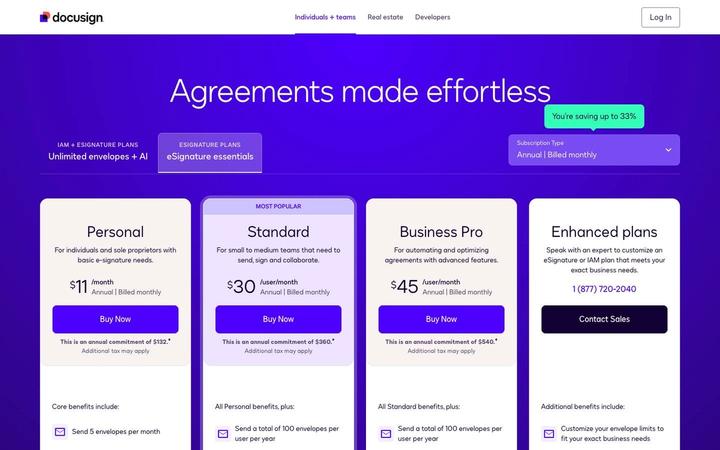
Docusign
$11/moDocusign sells eSignature per user with an envelope allowance as the second meter: Personal is $11 /month for 5 envelopes a month, Standard (MOST POPULAR) and Business Pro are $30 and $45 /user/month with 100 envelopes per user per year, and Enhanced plans run through a phone number and Contact Sales. Every paid card prints its full annual commitment under the price. The upgrade beyond eSignature is IAM, sold on 'Unlimited envelopes + AI', so envelope volume is the axis that moves a customer up the product line.
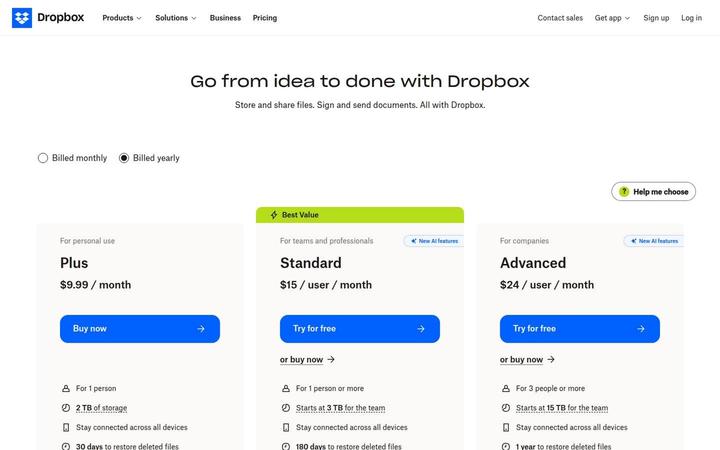
Dropbox
$9.99/moDropbox shows three paid cards, Plus at $9.99 / month for one person, Standard at $15 / user / month tagged Best Value, and Advanced at $24 / user / month for 3 people or more, with Basic Free and Enterprise in a compact row beneath. Storage is pooled at the team level, 'Starts at 3 TB for the team' on Standard and 15 TB on Advanced, and both team plans now carry 'AI in Dropbox' with a monthly AI credit allowance that scales by tier. Seats buy access, while the plan sets both the storage pool and the credit pool.