How Asana prices

Captured November 2, 2026 at 1440px wide. The page continues below the crop (9,425px in total).
Asana plans and prices
| Plan | Price | Billing |
|---|---|---|
| PersonalFor one or two people managing personal projects. | $0 | Free forever |
| StarterHighlightedFor small teams and professionals that need to track their projects progress and hit deadlines. | $10.99 | Per user, per month billed annually |
| AdvancedFor growing teams that turn goals into actionable projects, plan team capacity, and keep decisions moving. | $24.99 | Per user, per month billed annually |
| EnterpriseFor organizations that scale work across departments with security built in. | Contact sales for pricing |
As printed on the page captured November 2, 2026.
How does Asana pricing work?
The base metric is the user: Starter is $10.99 and Advanced $24.99 'Per user, per month billed annually', Personal is '$0 Free forever' for '2 users', and Enterprise reads 'Contact sales for pricing', with Enterprise+ adding 'SIEM integration, data residency, audit logs and dedicated workspaces'. AI is metered on top. Under 'Asana AI included:' each card lists 'AI Teammates and Asana Dash' and 'AI Studio' as underlined entries, and the page text gives the allowance behind them: 'Includes 5 requests per user per month, up to 50 requests per account' on Starter and Advanced, 'up to 250 requests per account' on Enterprise, plus AI Studio credits of 50K, 75K or 200K per billing account per month. Agents do work on a user's behalf, so a request is a natural unit for that value.
The hero, 'Agentic Work Management' and 'Power every team with AI', sets AI as the story of the page. A Monthly / Yearly switch with 'Save up to 18%' sits above four cards; Starter carries the filled 'Sign up' button, and Starter and Advanced add a 'Purchase now' link. Below come 'Compare all features', an 'AI for every workflow' section, the 'One flat rate for every AI request' explainer, prepaid and on-demand usage cards, three add-on modules, a logo band, a 'Deliver real productivity for every team' band linking to Asana Client Management and Asana Service Management, an eighteen-question FAQ, and a close with 'Get started' and 'Contact sales'. The motion is self-serve through Advanced and sales-led for Enterprise.
The AI layer is a full billing system on the page: an included pool shared across AI Teammates and Asana Dash, two ways to buy more, and controls. Usage packs are '$0.50 per AI request, billed upfront' and prepaid requests 'are yours for your full contract terms with no monthly resets'. Pay as you go is '$0.60 per AI request, billed monthly' with 'No upfront commitment required' and 'Set a monthly spend cap', a single metered rate with a guardrail. A ten-cent spread between prepaid and on-demand rewards commitment. The add-on row shows modular expansion at two levels: Timesheets and Budgets is 'Available as an add-on to Starter, Advanced or Enterprise plans.' with a 'Purchase now' button, while Compliance management and Permissions management stay Enterprise modules routed to 'Contact sales'. That is land and expand built into the page, with finance tooling bought online and governance tooling shaped in a conversation.
What does Asana's pricing page do well?
- The included AI allowance is stated in concrete units for every paid plan: 'Includes 5 requests per user per month, up to 50 requests per account'
- 'No rate cards, no surprises' states one published rate per AI request, and 'Administrative tasks are included' narrows what is billable
- Usage packs and Pay as you go sit side by side with the trade-off spelled out: $0.50 billed upfront for the contract term or $0.60 billed monthly with a spend cap
- Seat boundaries are explicit: Personal is '2 users', and Starter adds 'No user seat limits' and 'Unlimited free guests'
- Each add-on card states its eligible plans and pairs a buying CTA with 'Learn more', so a buyer sees at a glance which modules are self-serve
What does Asana's pricing page reveal about its pricing strategy?
- Seats price the product and AI requests price the agent work, a two-layer model with one shared request pool per account
- The spread between $0.50 prepaid and $0.60 on demand rewards commitment, and the on-demand path is a single per-request rate with a monthly spend cap
- AI Studio runs on its own credit allowance per billing account, a separate meter for building custom workflows
- Timesheets and Budgets sells to Starter, Advanced or Enterprise with 'Purchase now', while Compliance and Permissions management stay Enterprise modules behind 'Contact sales': expansion revenue split by motion
- The 'Deliver real productivity for every team' band points to Asana Client Management and Asana Service Management, positioning the pricing page as the entry to a product family
Learn with Orb
- GuideAn AI founder's guide to prepaid credits AI requests cost $0.50 in prepaid usage packs or $0.60 pay as you go, a spread that rewards commitment; Orb's guide covers how commitments earn a better rate per credit.
- ProductSpend controls Pay as you go comes with a monthly spend cap, and the FAQ lists usage alerts and admin controls; Orb's spend controls cover alerts and dashboards that keep usage predictable.
- GuideWhat is outcome-based pricing? Asana bills an AI request only when the work completes, a meter tied to results; Orb's guide covers what charging for outcomes means and how it differs from charging for usage.
Questions about Asana pricing
How much does Asana cost?
Asana's pricing starts at $10.99/user/mo. The page shows 4 plans, including a free plan, with the top plan priced through sales. Paying annually saves up to 18%.
What pricing model does Asana use?
Asana prices per seat, combined with usage-based pricing and credits. Buyers can sign up on their own or go through the sales team. Its plans are aimed mainly at mid-market companies.
Does Asana have a free plan?
Yes, Asana has a free plan. Paid plans start at $10.99/user/mo.
Does Asana offer an annual discount?
Yes, paying annually saves up to 18%. A toggle on the page switches between monthly and annual prices. The listed prices start at $10.99/user/mo. Terms for the plans priced through sales are set with the sales team.
How is Asana's pricing page laid out?
The page shows 4 plans, highlights Starter, and includes a comparison table and an FAQ. The breakdown above marks 14 points on it: 8 things it does well and 6 insights into the pricing.
How many AI requests are included in Asana's paid plans?
Starter and Advanced each include 5 requests per user per month, up to 50 requests per account, shared across AI Teammates and Asana Dash. Enterprise includes 5 requests per user per month, up to 250 requests per account. Each paid plan also carries its own AI Studio allowance of 50K, 75K or 200K credits per billing account per month. Administrative tasks with Asana Dash, like prioritizing your day or analyzing data in your Work Graph, "are included at no extra cost."
How much do additional Asana AI requests cost?
Asana sells extra AI requests two ways on Starter, Advanced, Enterprise, and Enterprise+ plans. Prepaid usage packs are "$0.50 per AI request, billed upfront", and those requests are yours for your full contract term with no monthly resets. Pay as you go is "$0.60 per AI request, billed monthly" with "No upfront commitment required" and the option to "Set a monthly spend cap". Both options include a live usage dashboard for visibility and control.
What add-ons are available for Asana plans?
Asana offers three optional modules, each billed separately on eligible plans. Timesheets and Budgets is "Available as an add-on to Starter, Advanced or Enterprise plans" and can be bought online with a "Purchase now" button. Compliance management and Permissions management are add-ons to the Enterprise plan, arranged through "Contact sales". Together they cover budget and time tracking, audit logs and security policies, and role-based access control.
From the page as captured November 2, 2026. Current prices are on asana.com
Airtable
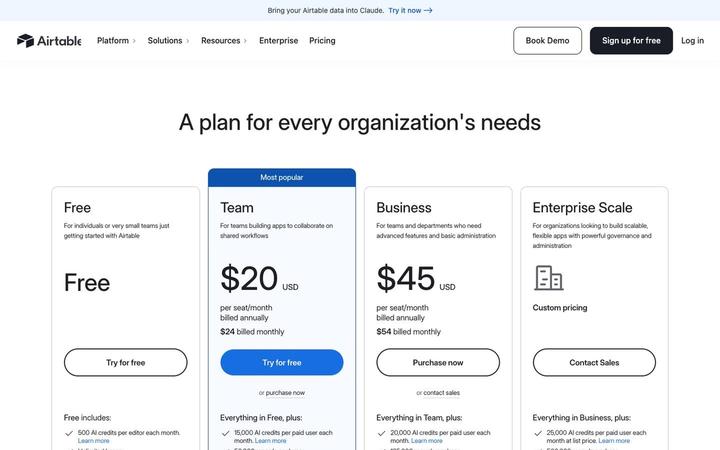
$20/seat/moAirtable prices four plans per seat, Free, Team at $20, Business at $45 and Enterprise Scale on custom pricing, and attaches a monthly pool of AI credits to every seat. Credits are the first bullet on each card and step from 500 per editor on Free to 25,000 per paid user, with top-up packs priced in the table. Annual and monthly prices print together on each card, so the commitment discount is visible at a glance.

ClickUp
$9/seat/moClickUp prices on seats with AI built into every plan: Free Forever at $0, Core at $9 and Business at $17 per 'user / mo · billed yearly' against struck regular prices, Enterprise at 'Custom', and a MAX plan at $100. Each tier carries its own pooled credit allowance, with top-ups at '$10 per 10K credits', framed by a '100% Money-back Guarantee', a written 'SUPER FAIR BILLING POLICY' and a savings calculator that ends in 'Get a quote'.
Docusign
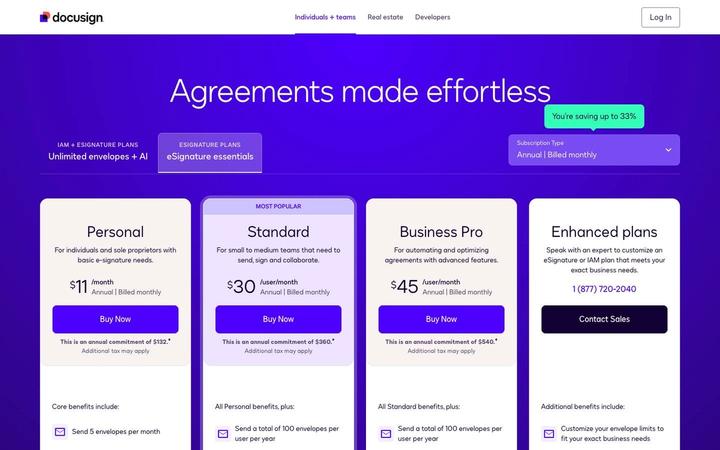
$11/moDocusign sells eSignature per user with an envelope allowance as the second meter: Personal is $11 /month for 5 envelopes a month, Standard (MOST POPULAR) and Business Pro are $30 and $45 /user/month with 100 envelopes per user per year, and Enhanced plans run through a phone number and Contact Sales. Every paid card prints its full annual commitment under the price. The upgrade beyond eSignature is IAM, sold on 'Unlimited envelopes + AI', so envelope volume is the axis that moves a customer up the product line.
Dropbox
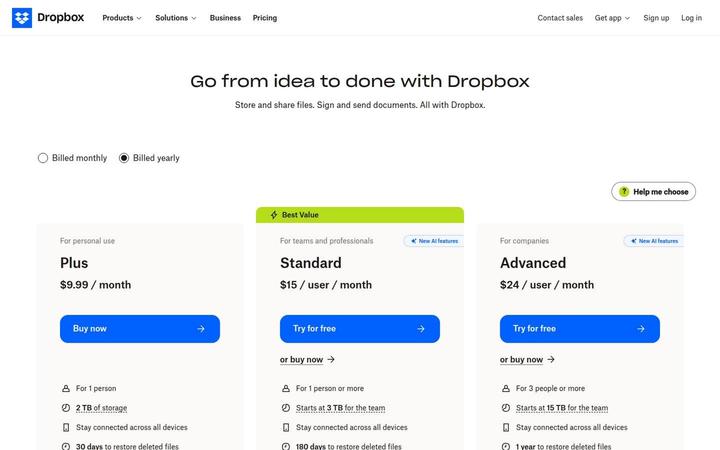
$9.99/moDropbox shows three paid cards, Plus at $9.99 / month for one person, Standard at $15 / user / month tagged Best Value, and Advanced at $24 / user / month for 3 people or more, with Basic Free and Enterprise in a compact row beneath. Storage is pooled at the team level, 'Starts at 3 TB for the team' on Standard and 15 TB on Advanced, and both team plans now carry 'AI in Dropbox' with a monthly AI credit allowance that scales by tier. Seats buy access, while the plan sets both the storage pool and the credit pool.

Linear
$10/user/moLinear prices per user, with annual billing switched on by default and a free plan that caps scope, not headcount: 'Unlimited members', '2 teams' and '250 issues'. The Free card now carries the agent layer too, 'Agent platform', 'Linear Agent' and 'Loops', while agent work such as coding sessions and loops draws on a separate AI credit meter. Four cards run from $0 to Custom, and a long comparison table marks each feature 'Included' or 'Not included' and prints real limits.
Miro
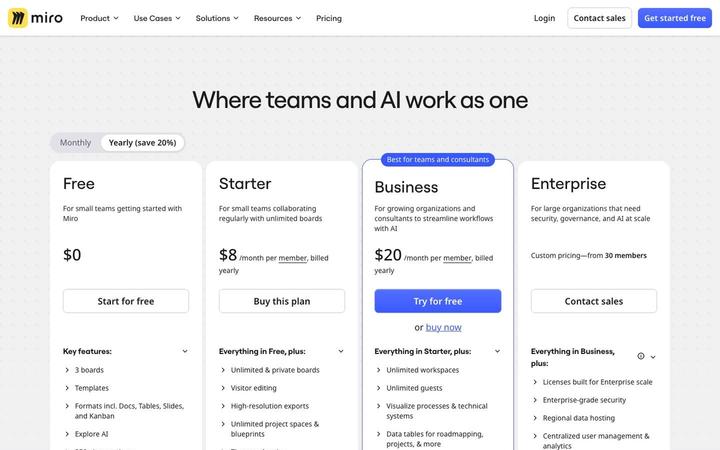
$8/member/moMiro sells seats with AI on top: Starter at $8 and Business at $20 per member per month billed yearly, each adding AI credits per member and a daily allowance of MCP calls for connected AI tools. At Enterprise, from 30 members, the credits become an org-wide pool that 'Starts from 2500 credits per month', a clear view of seat pricing taking on AI usage.