How ClickUp prices
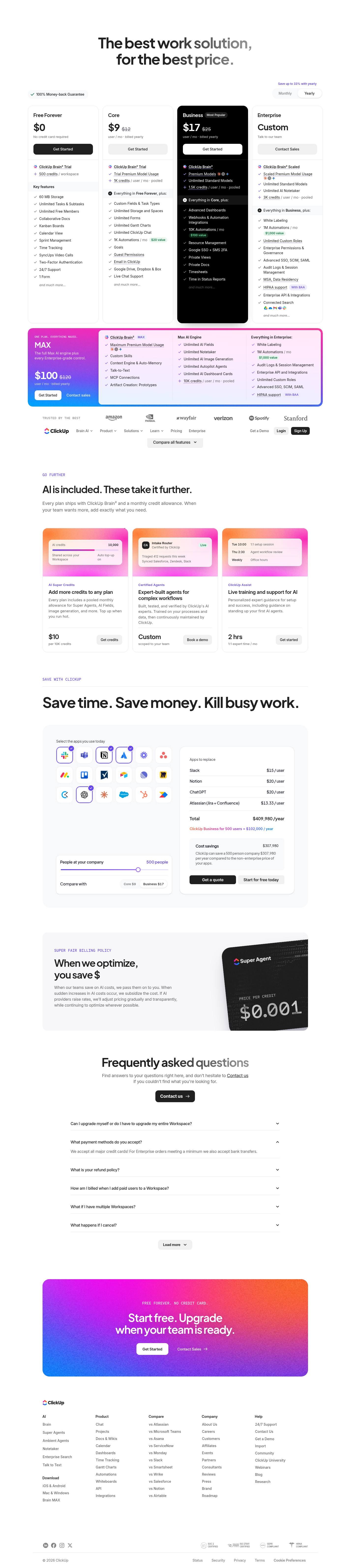
Captured November 2, 2026 at 1440px wide.
ClickUp plans and prices
| Plan | Price | Billing |
|---|---|---|
| Free ForeverNo credit card required | $0 | |
| Core | $9 | user / mo · billed yearly |
| BusinessHighlighted | $17 | user / mo · billed yearly |
| EnterpriseTalk to our team | Custom | |
| MAXThe full Max AI engine plus every Enterprise-grade control. | $100 | user / mo · billed yearly |
As printed on the page captured November 2, 2026.
How does ClickUp pricing work?
The value metric is the seat, and every seat now carries AI. Core prints '$9' with 'Regular price $12', Business '$17' with 'Regular price $25', both 'user / mo · billed yearly', Enterprise reads 'Custom' over 'Talk to our team', and Free Forever is '$0' with 'No credit card required'. Each card opens on a ClickUp Brain² block that sets two dials: model access, climbing from 'Trial Premium Model Usage' on Core to 'Premium Models' on Business and 'Scaled Premium Model Usage' on Enterprise, and a credit allowance, from '500 credits / workspace' on Free Forever through '1K credits / user / mo · pooled', '1.5K credits / user / mo · pooled' and '3K credits / user / mo · pooled'. A full-width MAX card under the row, 'ONE PLAN. EVERYTHING MAXED.', prints '$100' with 'Regular price $120' and pairs 'Maximum Premium Model Usage' and '10K credits / user / mo · pooled' with 'Everything in Enterprise:'. Seat features and AI capacity now move together, so one upgrade decision covers both.
The motion is self-serve from Free Forever through Business and on MAX, which offers 'Get Started' beside 'Contact sales', with Enterprise on 'Contact Sales' for 'White Labeling', 'Advanced SSO, SCIM, SAML', 'MSA, Data Residency' and 'HIPAA support With BAA'. The page opens on 'The best work solution, for the best price.' with a '100% Money-back Guarantee' badge, a Monthly / Yearly toggle under 'Save up to 33% with yearly', and Business inverted to black with a 'Most Popular' badge. A 'TRUSTED BY THE BEST' strip and a 'Compare all features' control lead into a 'GO FURTHER' section, 'AI is included. These take it further.', with three cards: AI Super Credits at '$10 per 10K credits', Certified Agents at 'Custom scoped to your team' behind 'Book a demo', and ClickUp Assist at '2 hrs 1:1 expert time / mo'. The savings calculator, the billing policy, a six-question FAQ and a closing 'Start free. Upgrade when your team is ready.' banner complete the page.
Under the hood, each paid seat carries a credit pool shared across the Workspace, with top-ups at a published unit rate and an 'Auto top-up' switch on the credits card. The struck regular prices anchor the yearly rate on every paid card, and the gap widens with the tier, $12 to $9 on Core and $25 to $17 on Business. MAX prints a self-serve rate for Enterprise-grade controls plus the largest AI allowance, opening the top of the ladder to buyers who want maximum AI capacity online, while Enterprise keeps room for commitments and volume terms. The 'SUPER FAIR BILLING POLICY' now sits beside a card reading 'PRICE PER CREDIT' '$0.001', committing that 'When our teams save on AI costs, we pass them on to you.' and that rates will adjust 'gradually and transparently'. The calculator offers a 'Compare with' switch between 'Core $9' and 'Business $17' against 18 per-user apps, with the 500-person example at '$409,980 /year' against 'ClickUp Business for 500 users = $102,000 / year' for 'Cost savings $307,980'. Bundling credits into the seat while publishing the top-up rate is worth borrowing for any product where AI usage varies by user.
What does ClickUp's pricing page do well?
- Every paid card prints the yearly rate beside a struck regular price, '$9' against 'Regular price $12' on Core and '$17' against 'Regular price $25' on Business, under 'Save up to 33% with yearly'
- Each plan states its AI credit allowance in one format, from '1K credits / user / mo · pooled' to '10K credits / user / mo · pooled'
- Automation allowances carry a dollar figure, '10K Automations / mo' at '$100 value' on Business and '1M Automations / mo' at '$1,000 value' on Enterprise
- The credits card publishes '$10 per 10K credits' with an 'Auto top-up' control, so extra AI usage is priced up front
- A '100% Money-back Guarantee' badge at the top and a 'FREE FOREVER. NO CREDIT CARD.' banner at the close frame the commitment at both ends of the page
What does ClickUp's pricing page reveal about its pricing strategy?
- AI credits are sized per user and pooled across the Workspace, so each seat price carries a credit pool that light and heavy users share
- Model access is a tier gate: 'Trial Premium Model Usage', 'Premium Models', 'Scaled Premium Model Usage' and 'Maximum Premium Model Usage' track the cost of premium inference
- MAX prints a self-serve price for 'Everything in Enterprise:' plus the Max AI Engine, turning the top of the ladder into an AI capacity purchase
- Free Forever counts credits per workspace, '500 credits / workspace', while paid plans count per user, which keeps free AI usage bounded as a team grows
- The FAQ answer 'For Enterprise orders meeting a minimum we also accept bank transfers.' points to minimum order sizes in Enterprise deals
Learn with Orb
- ProductPrepaid credits AI Super Credits at $10 per 10,000 form a monthly allowance pooled across the Workspace, topped up by each AI tier; Orb's prepaid credits product covers plans built on credit allocations like these.
- GuideHow to price your AI agent: a framework The written AI billing policy commits to passing on cost savings and absorbing sudden increases, a direct answer to the compute cost behind every AI use that Orb's framework addresses.
- ProductExperience Kit The savings calculator closes with an official quote a champion can share with the team; Orb's Experience Kit builds calculators and checkout flows so customers can plan spend and see value.
Questions about ClickUp pricing
How much does ClickUp cost?
ClickUp's pricing starts at $9/seat/mo. The page shows 5 plans, including a free plan, with the top plan priced through sales. Paying annually saves 33%.
What pricing model does ClickUp use?
ClickUp prices per seat, combined with credits and a mix of seats and usage. Buyers can sign up on their own or go through the sales team. Its plans are aimed mainly at small businesses.
Does ClickUp have a free plan?
Yes, ClickUp has a free plan. Paid plans start at $9/seat/mo.
Does ClickUp offer an annual discount?
Yes, paying annually saves 33%. A toggle on the page switches between monthly and annual prices. The listed prices start at $9/seat/mo. Terms for the plans priced through sales are set with the sales team.
How is ClickUp's pricing page laid out?
The page shows 5 plans, highlights Business, and includes a calculator and an FAQ. The breakdown above marks 14 points on it: 8 things it does well and 6 insights into the pricing.
How do AI credits work on ClickUp plans?
Every plan includes a pooled monthly credit allowance: '500 credits / workspace' on Free Forever, '1K credits / user / mo · pooled' on Core, '1.5K credits / user / mo · pooled' on Business, '3K credits / user / mo · pooled' on Enterprise and '10K credits / user / mo · pooled' on MAX. Credits cover Super Agents, AI Fields, image generation, and more. Extra credits cost '$10 per 10K credits', with an 'Auto top-up' option on the credits card.
What does the ClickUp MAX plan include?
MAX is priced at '$100' with 'Regular price $120', per 'user / mo · billed yearly', and is described as 'The full Max AI engine plus every Enterprise-grade control.' It adds 'Maximum Premium Model Usage', 'Custom Skills', 'MCP Connections' and '10K credits / user / mo · pooled' on top of 'Everything in Enterprise:', including 'White Labeling' and '1M Automations / mo'. Buyers can choose 'Get Started' or 'Contact sales'.
How many automations per month does each ClickUp plan include?
Core includes '1K Automations / mo', listed at '$20 value'. Business raises this to '10K Automations / mo' at '$100 value'. Enterprise and MAX each include '1M Automations / mo', listed at '$1,000 value'.
From the page as captured November 2, 2026. Current prices are on clickup.com
Airtable
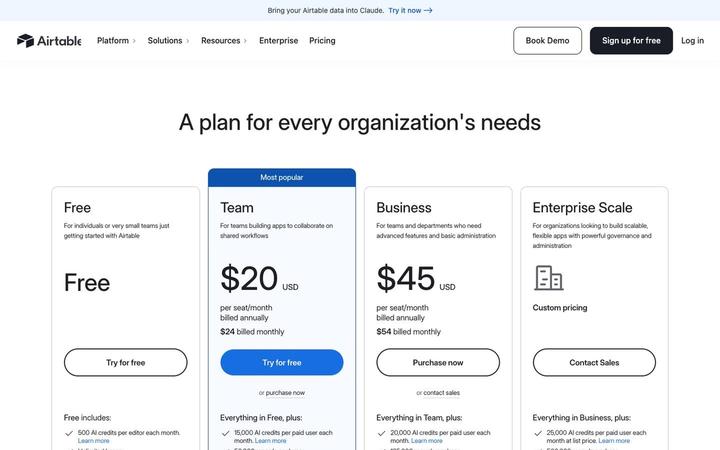
$20/seat/moAirtable prices four plans per seat, Free, Team at $20, Business at $45 and Enterprise Scale on custom pricing, and attaches a monthly pool of AI credits to every seat. Credits are the first bullet on each card and step from 500 per editor on Free to 25,000 per paid user, with top-up packs priced in the table. Annual and monthly prices print together on each card, so the commitment discount is visible at a glance.
Asana
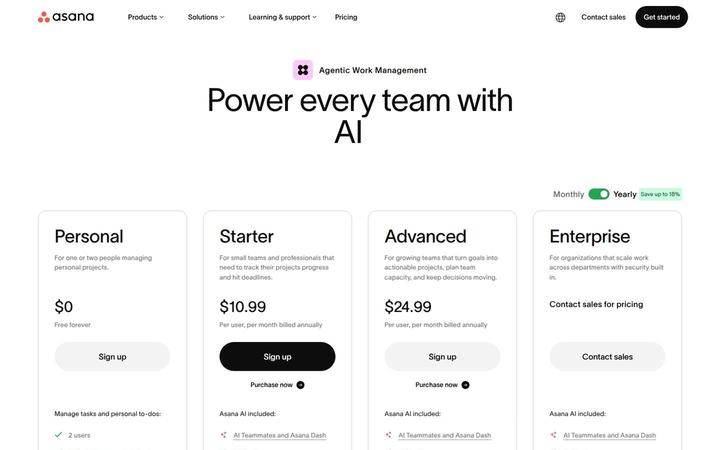
$10.99/user/moAsana pairs a per-user ladder, Personal at $0, Starter at $10.99, Advanced at $24.99 and Enterprise through sales, with a metered AI layer priced in the open. Each paid plan includes a pool of AI requests, and more cost $0.50 each in prepaid usage packs or $0.60 each pay as you go, under the banner 'One flat rate for every AI request'. Seats price the work management product, requests price the work AI Teammates and Asana Dash do, and optional modules such as Timesheets and Budgets extend down to Starter.
Dropbox
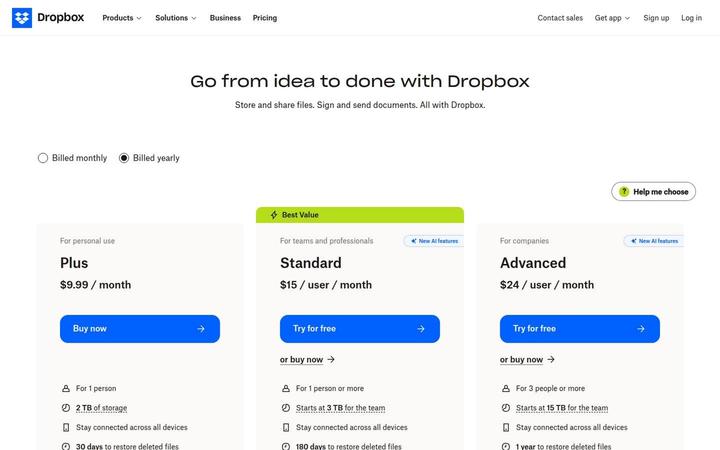
$9.99/moDropbox shows three paid cards, Plus at $9.99 / month for one person, Standard at $15 / user / month tagged Best Value, and Advanced at $24 / user / month for 3 people or more, with Basic Free and Enterprise in a compact row beneath. Storage is pooled at the team level, 'Starts at 3 TB for the team' on Standard and 15 TB on Advanced, and both team plans now carry 'AI in Dropbox' with a monthly AI credit allowance that scales by tier. Seats buy access, while the plan sets both the storage pool and the credit pool.

Linear
$10/user/moLinear prices per user, with annual billing switched on by default and a free plan that caps scope, not headcount: 'Unlimited members', '2 teams' and '250 issues'. The Free card now carries the agent layer too, 'Agent platform', 'Linear Agent' and 'Loops', while agent work such as coding sessions and loops draws on a separate AI credit meter. Four cards run from $0 to Custom, and a long comparison table marks each feature 'Included' or 'Not included' and prints real limits.
Miro
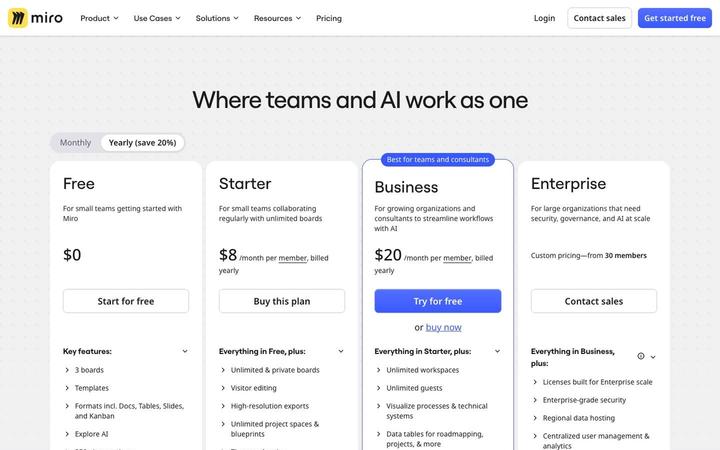
$8/member/moMiro sells seats with AI on top: Starter at $8 and Business at $20 per member per month billed yearly, each adding AI credits per member and a daily allowance of MCP calls for connected AI tools. At Enterprise, from 30 members, the credits become an org-wide pool that 'Starts from 2500 credits per month', a clear view of seat pricing taking on AI usage.
monday.com
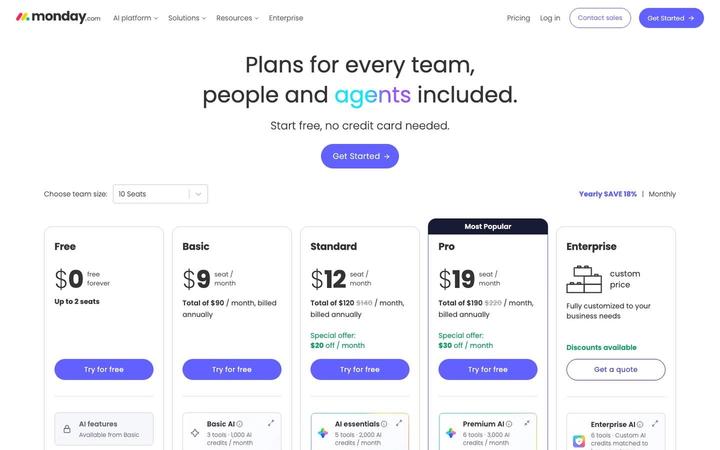
$9/seat/momonday.com prices work management per seat with a pool of AI credits on every paid plan, and the headline says why: 'Plans for every team, people and agents included.' A team-size selector turns each seat price into a monthly total, so Basic at $9 a seat reads 'Total of $90 / month, billed annually' at 10 seats. The same page carries full pricing for monday CRM, monday service and monday dev.