Captured November 2, 2026 at 1440px wide.
Zoom plans and prices
| Plan | Price | Billing |
|---|---|---|
| Workplace BasicGet started with meetings, chat, and AI tools built for how you work. | Free | |
| Workplace ProThink bigger with more AI, more capacity, and more control. | $14.16 | /user/month · billed annually |
| Workplace BusinessThe tools, scale, and control your organization needs to grow with confidence. | $18.33 | /user/month · billed annually |
| Workplace Enterprise | Talk to us |
As printed on the page captured November 2, 2026.
How does Zoom pricing work?
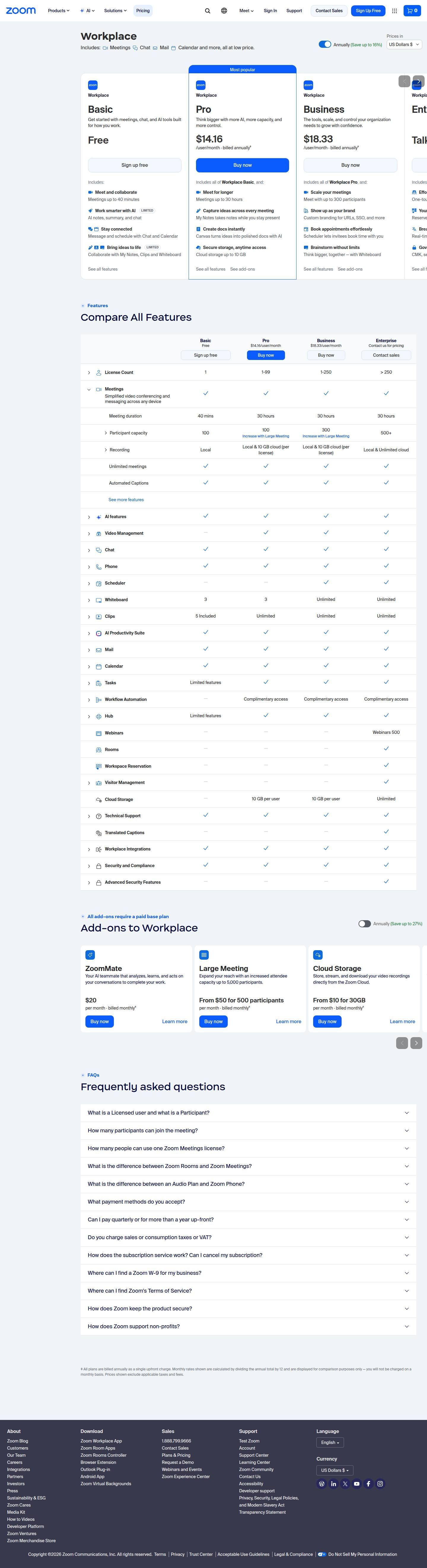
The licensed user is the value metric, and the plan bundles a suite around it: 'Includes: Meetings Chat Mail Calendar and more, all at low price.' Each card climbs a tagline ladder. Basic, 'Get started with meetings, chat, and AI tools built for how you work.', is Free with 'Meetings up to 40 minutes' and AI notes, summary and chat marked LIMITED. Pro, 'Think bigger with more AI, more capacity, and more control.', is $14.16 /user/month billed annually with 'Meetings up to 30 hours', My Notes, 'Canvas turns ideas into polished docs with AI' and 'Cloud storage up to 10 GB'. Business, 'The tools, scale, and control your organization needs to grow with confidence.', is $18.33 and adds 'Meet with up to 300 participants', 'Custom branding for URLs, SSO, and more' and Scheduler. Enterprise adds 'One-touch meeting rooms in any space', workspace reservation, 'Real-time captions in 35+ languages' and governance: 'CMK, sensitivity labels, and hybrid cloud'. A License Count row, 1, 1-99, 1-250 and > 250, maps headcount to plan.
The motion is self-serve through Business and sales-led at Enterprise. Basic says 'Sign up free', Pro carries a Most popular ribbon and the filled 'Buy now', Business has its own 'Buy now', and Enterprise reads 'Talk to us' with 'Contact sales', where large deployments are priced with room for volume and terms. The page runs from 'Workplace', an 'Annually (Save up to 16%)' toggle and a 'Prices in' US Dollars $ selector, through the four plan cards, Compare All Features with a header row of prices and CTAs, and Add-ons to Workplace with its own 'Annually (Save up to 27%)' toggle, to a thirteen-question FAQ and the billing footnote. The cards sell outcomes in a bold line over one plain fact, and the table below holds the precise meeting duration, participant capacity, storage and support rows, so each layer of the page does one job.
The ‡ note defines the billing mechanics: 'All plans are billed annually as a single upfront charge. Monthly rates shown are calculated by dividing the annual total by 12 and are displayed for comparison purposes only'. The per-user monthly figure is a comparison unit, and the commitment is an annual prepay. Add-ons run on a separate term and a deeper discount, up to 27% on annual against up to 16% on plans, and 'All add-ons require a paid base plan', so the seat is the anchor and the add-on catalog is the expansion engine. Governance is packaged as one line, Advanced Data Protection, 'Customer Managed Keys and Sensitivity Labels for full data control.', priced through sales. The AI lines sit side by side at flat standard rates, ZoomMate at $20, AI Productivity Suite at $10, Custom Avatars at $22 and Live Translation at $5, each 'per month · billed monthly‡' in the capture. Capacity ceilings in the table link to the add-on that lifts them, 'Increase with Large Meeting', and pairing every ceiling with a priced add-on is the idea most worth borrowing.
What does Zoom's pricing page do well?
- Pro is marked Most popular with a ribbon, a blue border and the filled Buy now button, giving self-serve buyers a clear default
- 'Annually (Save up to 16%)' and a 'Prices in' currency selector sit at the top of the plan section, settling term and currency before the first price
- Each card row pairs a bold benefit, such as 'Meet for longer', with one plain fact, 'Meetings up to 30 hours', so outcome and limit read together
- Compare All Features opens with a License Count row, 1, 1-99, 1-250 and > 250, that maps team size to plan
- Participant capacity in the comparison table links to 'Increase with Large Meeting' under Pro and Business, naming the add-on that lifts the ceiling
What does Zoom's pricing page reveal about its pricing strategy?
- Displayed monthly rates are the annual total divided by 12, so the per-user figure is a comparison unit for an annual upfront charge
- Add-ons save up to 27% on annual terms against up to 16% for plans, a deeper incentive to commit on the expansion lines
- 'All add-ons require a paid base plan' makes the seat the anchor and the add-on catalog the expansion engine
- Basic marks its AI and collaboration rows LIMITED and Pro opens with 'more AI', so AI depth is a main reason to upgrade
- The step from Pro to Business, $4.17 per user, buys scale and control: 300 participants, custom branding, SSO and Scheduler
Learn with Orb
- GuideZoom pricing: Features explained and how they built it Orb's buyer guide to Zoom's plans and costs, and how the billing behind them was built. This page covers how the pricing page presents them.
- Guide8 SaaS pricing best practices with concrete examples Basic is free with AI summaries for 3 hosted meetings, 20 AI queries and 3 note-taking uses a month; Orb's practices cover free plans that attract users and prompt an upgrade.
- GuideBuild a pricing and packaging strategy in 9 steps Plans separate on meeting capacity, AI depth and admin control, and seventeen add-ons let a paid account grow one line at a time; Orb's packaging guide covers what separates plans and how a lineup scales.
Questions about Zoom pricing
How much does Zoom cost?
Zoom's pricing starts at $14.16/user/mo. The page shows 4 plans, including a free plan, with the top plan priced through sales. Paying annually saves 16%.
What pricing model does Zoom use?
Zoom prices per seat. Buyers can sign up on their own or go through the sales team. Its plans are aimed mainly at small businesses.
Does Zoom have a free plan?
Yes, Zoom has a free plan. Paid plans start at $14.16/user/mo.
Does Zoom offer an annual discount?
Yes, paying annually saves 16%. A toggle on the page switches between monthly and annual prices. The listed prices start at $14.16/user/mo. Terms for the plans priced through sales are set with the sales team.
How is Zoom's pricing page laid out?
The page shows 4 plans, highlights Pro, and includes a comparison table and an FAQ. The breakdown above marks 14 points on it: 7 things it does well and 7 insights into the pricing.
How many participants can join a Zoom meeting, and how do I add more?
The comparison table lists participant capacity of 100 on Basic and Pro, 300 on Business and 500+ on Enterprise. Under Pro and Business, the table links to "Increase with Large Meeting", an add-on that offers "an increased attendee capacity up to 5,000 participants." Large Meeting is priced "From $50 for 500 participants per month", billed monthly.
Do Zoom add-ons require a paid Zoom Workplace plan?
Yes, the page states "All add-ons require a paid base plan", so add-ons attach to a Pro, Business or Enterprise subscription. The add-on catalog has its own "Annually (Save up to 27%)" toggle, with options such as ZoomMate at $20 per month, Live Translation at $5 per month and Cloud Storage "From $10 for 30GB per month". Lines such as Premier Support, Advanced Data Protection, Zoom Node and Zoom Mesh are arranged through Contact sales.
What AI add-ons can I buy for Zoom Workplace?
The add-on catalog lists ZoomMate, "Your AI teammate that analyzes, learns, and acts on your conversations to complete your work.", at $20 per month and AI Productivity Suite at $10 per month. Custom Avatars, which lets you "Create a lifelike AI version of yourself with voice replication and multilingual communication.", is $22 per month, and Live Translation is $5 per month. Each is shown "per month · billed monthly" and requires a paid base plan.
From the page as captured November 2, 2026. Current prices are on zoom.us
1Password
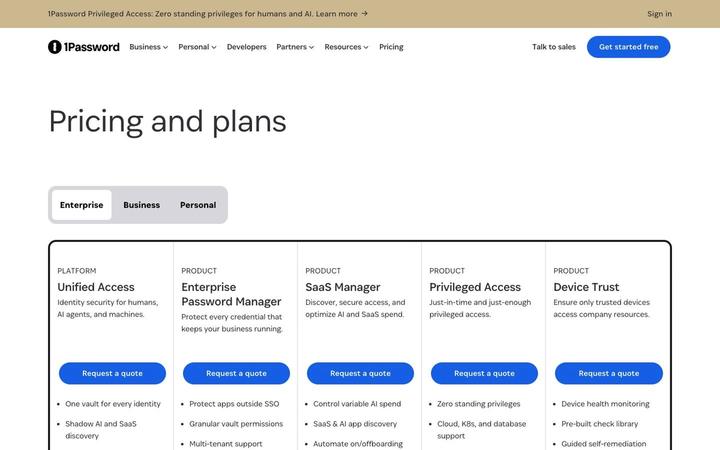
Quote1Password's pricing page opens on its Enterprise tab, where a platform and four products sit side by side and each ends in 'Request a quote'. The packaging is the story: Unified Access is labeled PLATFORM, its four components are labeled PRODUCT, and the FAQ confirms a buyer can take the whole platform or any part of it. Business and Personal tabs carry the self-serve plans on the same URL.
Airtable
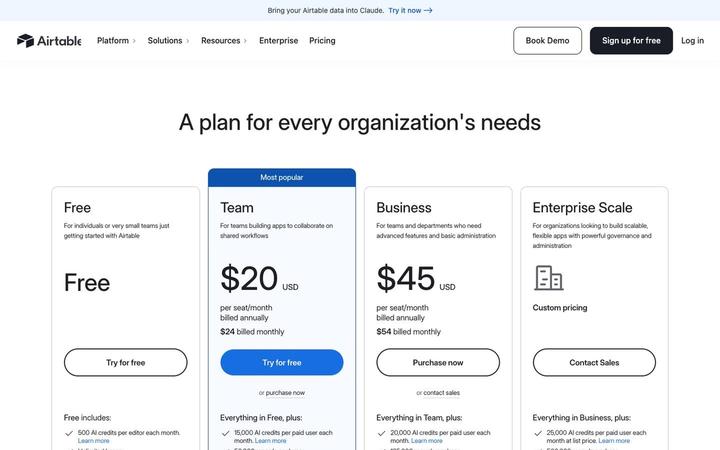
$20/seat/moAirtable prices four plans per seat, Free, Team at $20, Business at $45 and Enterprise Scale on custom pricing, and attaches a monthly pool of AI credits to every seat. Credits are the first bullet on each card and step from 500 per editor on Free to 25,000 per paid user, with top-up packs priced in the table. Annual and monthly prices print together on each card, so the commitment discount is visible at a glance.
Asana
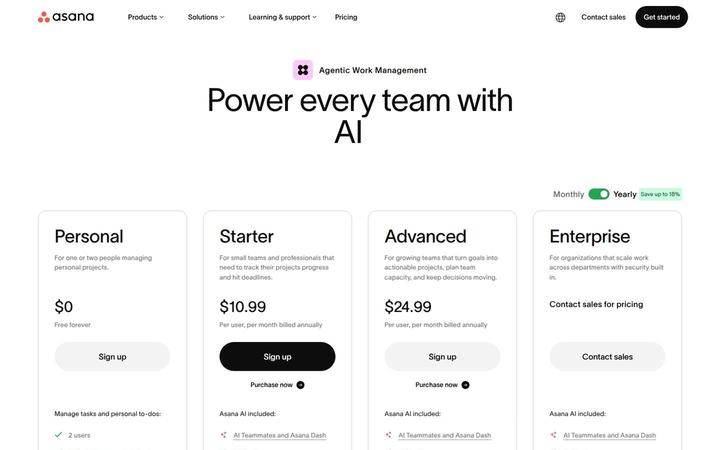
$10.99/user/moAsana pairs a per-user ladder, Personal at $0, Starter at $10.99, Advanced at $24.99 and Enterprise through sales, with a metered AI layer priced in the open. Each paid plan includes a pool of AI requests, and more cost $0.50 each in prepaid usage packs or $0.60 each pay as you go, under the banner 'One flat rate for every AI request'. Seats price the work management product, requests price the work AI Teammates and Asana Dash do, and optional modules such as Timesheets and Budgets extend down to Starter.