
Captured September 18, 2026 at 1440px wide. The page continues below the crop (11,497px in total).
Miro plans and prices
| Plan | Price | Billing |
|---|---|---|
| FreeFor small teams getting started with Miro | $0 | |
| StarterFor small teams collaborating regularly with unlimited boards | $8 | month per member, billed yearly |
| BusinessHighlightedFor growing organizations and consultants to streamline workflows with AI | $20 | month per member, billed yearly |
| EnterpriseFor large organizations that need security, governance, and AI at scale | Custom pricing | from 30 members |
As printed on the page captured September 18, 2026.
How does Miro pricing work?
The seat is the base metric and AI is metered on top of it. Starter is '$8/month per member, billed yearly' and Business '$20/month per member, billed yearly', with the toggle reading 'Yearly (save 20%)'. Free costs $0 and leads with '3 boards'. Each paid card then carries two AI allowances: '25 AI credits/member/month' and '500 MCP calls per day' on Starter, '50 AI credits/member/month' and '2,000 MCP calls per day' on Business. Packaging steps from unlimited boards and 'Visitor editing' on Starter to 'Unlimited workspaces', 'Unlimited guests', 'AI workflows & agents', two-way integrations and SSO on Business, then to SCIM, regional data hosting in the EU, US, Australia and Japan, and 'Admin controls for AI' on Enterprise.
The motion runs from a free start to a sales-led top. Free has 'Start for free', Starter 'Buy this plan', Business 'Try for free' with 'or buy now', and Enterprise 'Contact sales' with custom pricing 'from 30 members'. Business carries the 'Best for teams and consultants' flag and the filled button, and the FAQ backs it: 'Try Business plan free for 14 days and decide from there.' The headline, 'Where teams and AI work as one', sets the theme. Below the cards sit add-ons for Enterprise Guard and Premium support, an Enterprise Guard band, a comparison table that opens on a 'Select plan' row of CTAs, customer logos, a six-tile security and compliance grid and an FAQ that opens with 'How do I pick the right plan?'.
Under the hood, the credit pool sits behind the seats. On self-serve plans each member brings a fixed credit allowance, and at Enterprise the 'Number of credits scales with your seat count and pools org-wide', with admins able to monitor usage. That is a credit pool attached to seats: the license sets the size of the pool, and the org draws it down wherever AI is used. MCP calls per day work as a rate limit on agent traffic, a cost control for a canvas that AI tools read and write through. In Security and AI trust, the Enterprise column marks items such as 'Encryption key management', 'eDiscovery' and 'Prompt blocking' as 'Paid add-on', so the top tier is a base plus modules. Worth borrowing is the pooled-credit design: it lets heavy and light AI users share one allowance without per-person top-ups.
What does Miro's pricing page do well?
- The billing toggle reads 'Yearly (save 20%)' with yearly preselected, so the saving is stated in the control itself
- Business pairs a filled 'Try for free' with an 'or buy now' link, serving evaluators and ready buyers from one card
- Feature bullets carry one-line explanations and 'includes a video demo' hooks, so the plan cards double as a product tour
- Enterprise states a seat floor, 'from 30 members', so buyers can place themselves before contacting sales
- The comparison table labels 'Paid add-on' items in the Enterprise column, so a buyer sees which controls are priced separately
What does Miro's pricing page reveal about its pricing strategy?
- A credit pool behind each seat: credits are per member on Starter and Business, then scale with seat count and pool org-wide at Enterprise
- MCP calls per day, from 100 on Free to 10,000 on Enterprise, meter agent traffic as a daily rate limit sized to the plan
- The trial goes to Business, the recommended plan, while Starter is bought directly at $8
- Enterprise is a base plus modules: Enterprise Guard, Premium support and several security and AI trust controls are add-ons
- 'Admin controls for AI' and a usage dashboard on Enterprise show AI spend becoming something an org governs, like seats
Learn with Orb
- ProductPrepaid credits AI credits per member on Starter and Business become an org-wide pool from 2500 credits a month at Enterprise, a credit allocation tied to seats that Orb's prepaid credits covers.
- GuidePricing AI agents: plans, costs and monetization models MCP calls per day and AI credits per member meter agent traffic on top of the seat; Orb's CEO covers how teams meter AI work that arrives per call, token and event.
- ProductSpend controls Admin controls for AI and a usage dashboard on Enterprise make AI spend something an org can see and govern, the ground Orb's spend controls cover with alerts and dashboards.
Questions about Miro pricing
How much does Miro cost?
Miro's pricing starts at $8/member/mo. The page shows 4 plans, including a free plan, with the top plan priced through sales. Paying annually saves 20%.
What pricing model does Miro use?
Miro prices per seat, combined with credits. Buyers can sign up on their own or go through the sales team. Its plans are aimed mainly at small businesses.
Does Miro have a free plan?
Yes, Miro has a free plan, and its paid plans offer a free trial. Paid plans start at $8/member/mo.
Does Miro offer an annual discount?
Yes, paying annually saves 20%. A toggle on the page switches between monthly and annual prices. The listed prices start at $8/member/mo. Terms for the plans priced through sales are set with the sales team.
How is Miro's pricing page laid out?
The page shows 4 plans, highlights Business, and includes a comparison table and an FAQ. The breakdown above marks 14 points on it: 6 things it does well and 8 insights into the pricing.
How do Miro AI credits work on each plan?
Miro meters AI with credits that come with each plan: Free includes a "Limited trial", Starter includes "25 AI credits/member/month" and Business includes "50 AI credits/member/month". Credits cover tasks like generating diagrams, tables and summaries, clustering sticky notes, and running AI workflows and agents. On Enterprise, the allowance "Starts from 2500 credits per month", and the "Number of credits scales with your seat count and pools org-wide." Admins can monitor credit usage from a dashboard.
How many MCP calls per day does Miro include on each plan?
Miro sets a daily MCP call allowance by plan: 100 MCP calls on Free, 500 on Starter, 2,000 on Business and 10,000 on Enterprise. MCP calls connect Miro with AI tools such as Claude, Cursor or Copilot, with context flowing both ways. Uses include generating code from board content and visualizing Mermaid diagrams on the canvas.
What add-ons are available for Miro Enterprise?
Miro Enterprise, available from 30 members, offers two headline add-ons: Enterprise Guard, which adds "Advanced data security and governance features including automated data discovery and classification", and Premium support, which provides "premium 24/7 support and guaranteed SLAs". The comparison table also marks several controls as "Paid add-on" for Enterprise, including Encryption key management, eDiscovery, Content lifecycle management, Prompt blocking and AI Custom Terms of Service. This lets an organization build its Enterprise plan around the security and AI governance modules it needs.
From the page as captured September 18, 2026. Current prices are on miro.com
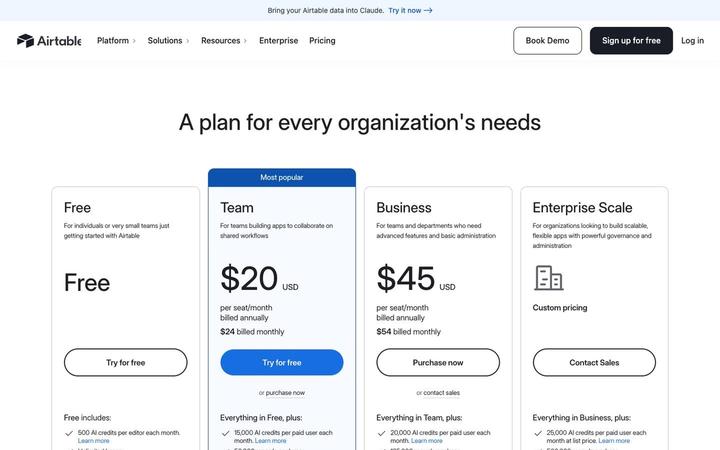
Airtable
$20/seat/moAirtable prices four plans per seat, Free, Team at $20, Business at $45 and Enterprise Scale on custom pricing, and attaches a monthly pool of AI credits to every seat. Credits are the first bullet on each card and step from 500 per editor on Free to 25,000 per paid user, with top-up packs priced in the table. Annual and monthly prices print together on each card, so the commitment discount is visible at a glance.
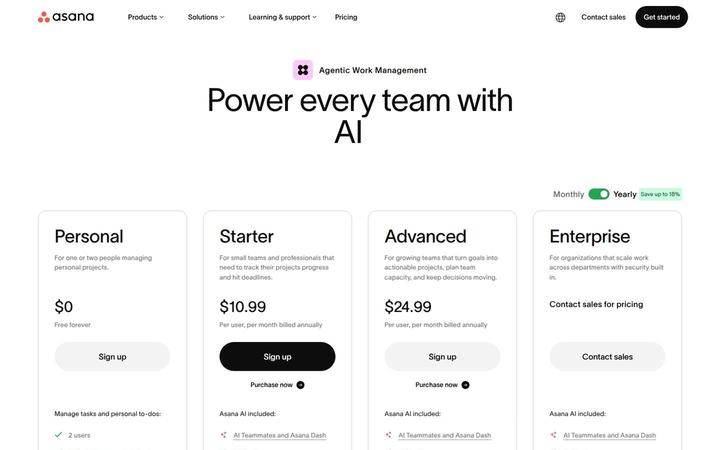
Asana
$10.99/user/moAsana pairs a per-user ladder, Personal at $0, Starter at $10.99, Advanced at $24.99 and Enterprise through sales, with a metered AI layer priced in the open. Each paid plan includes a pool of AI requests, and more cost $0.50 each in prepaid usage packs or $0.60 each pay as you go, under the banner 'One flat rate for every AI request'. Seats price the work management product, requests price the work AI Teammates and Asana Dash do, and optional modules such as Timesheets and Budgets extend down to Starter.

ClickUp
$9/seat/moClickUp prices on seats with AI built into every plan: Free Forever at $0, Core at $9 and Business at $17 per 'user / mo · billed yearly' against struck regular prices, Enterprise at 'Custom', and a MAX plan at $100. Each tier carries its own pooled credit allowance, with top-ups at '$10 per 10K credits', framed by a '100% Money-back Guarantee', a written 'SUPER FAIR BILLING POLICY' and a savings calculator that ends in 'Get a quote'.
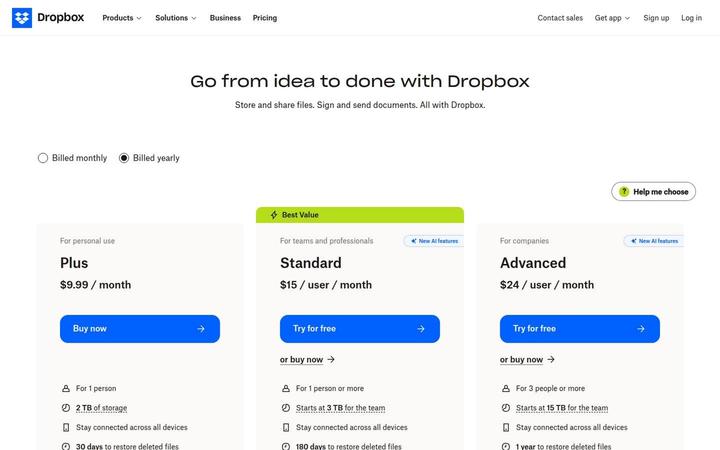
Dropbox
$9.99/moDropbox shows three paid cards, Plus at $9.99 / month for one person, Standard at $15 / user / month tagged Best Value, and Advanced at $24 / user / month for 3 people or more, with Basic Free and Enterprise in a compact row beneath. Storage is pooled at the team level, 'Starts at 3 TB for the team' on Standard and 15 TB on Advanced, and both team plans now carry 'AI in Dropbox' with a monthly AI credit allowance that scales by tier. Seats buy access, while the plan sets both the storage pool and the credit pool.

Linear
$10/user/moLinear prices per user, with annual billing switched on by default and a free plan that caps scope, not headcount: 'Unlimited members', '2 teams' and '250 issues'. The Free card now carries the agent layer too, 'Agent platform', 'Linear Agent' and 'Loops', while agent work such as coding sessions and loops draws on a separate AI credit meter. Four cards run from $0 to Custom, and a long comparison table marks each feature 'Included' or 'Not included' and prints real limits.
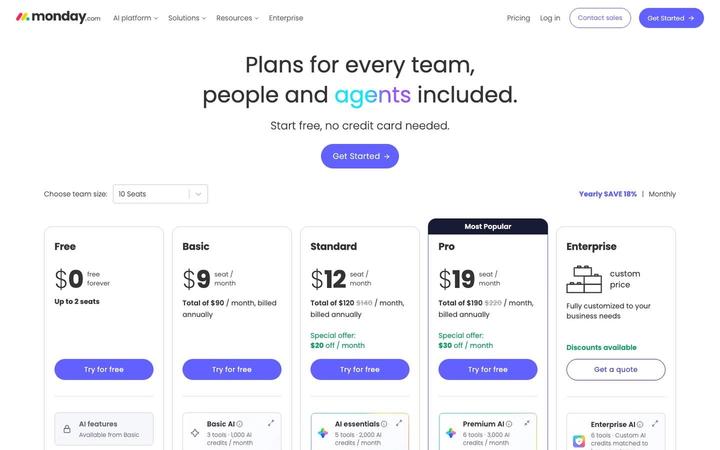
monday.com
$9/seat/momonday.com prices work management per seat with a pool of AI credits on every paid plan, and the headline says why: 'Plans for every team, people and agents included.' A team-size selector turns each seat price into a monthly total, so Basic at $9 a seat reads 'Total of $90 / month, billed annually' at 10 seats. The same page carries full pricing for monday CRM, monday service and monday dev.