How Supabase prices

Captured October 26, 2026 at 1440px wide. The page continues below the crop (11,652px in total).
Supabase plans and prices
| Plan | Price | Billing |
|---|---|---|
| FREEPerfect for passion projects & simple websites. | $0 | / month |
| PROFor production applications with the power to scale. | $25 | / month |
| TEAMAdd features such as SSO, control over backups, and industry certifications. | $599 | / month |
| ENTERPRISEFor large-scale applications running Internet scale workloads. | Custom |
As printed on the page captured October 26, 2026.
How does Supabase pricing work?
The bill has three layers. A plan subscription per organization sets the base, 'From $25 / month' on Pro with 'First project included. Additional projects from $10/mo.'; compute per project is billed hourly from Micro at $10 to 16XL at $3,730, with 'Paid plans include $10/mo in compute credits, enough to cover one Micro instance'; and resources are metered as quota then rate, '100,000 monthly active users then $0.00325 per MAU', '8 GB disk size per project then $0.125 per GB', '250 GB egress then $0.09 per GB', '100 GB file storage then $0.0213 per GB' and now Log Ingestion at '20 GB included then $0.50 per GB'. Team members are Unlimited on every plan, so the bill follows data and traffic. Team at 'From $599 / month' adds 'SOC2 & ISO 27001', project-scoped and read-only access, 'SSO for Supabase Dashboard' and 'Priority email support & SLAs'.
'Predictable pricing, designed to scale' sits over 'Start building for free, collaborate with your team, then scale to millions of users' and a row of Copy as Markdown, Ask ChatGPT and Ask Claude links. Pro is raised and badged 'Most Popular', and Enterprise leads with 'Technical Account Management'. Under the cards, Compare Plans sits beside a 'Learn how billing works' link. Between the cards and the full comparison sit 'How compute pricing works', a two-step estimator with a live monthly estimate, the compute size table, advanced disk configurations and 'Fine-tune your project' with the spend cap and priced add-ons. The comparison table covers Database, Auth, Storage, Realtime, Edge Functions, Dashboard, Platform Security and Compliance and Support, and the FAQ opens on the two questions a usage buyer asks first.
Under the hood, the model separates the platform from the infrastructure. The plan fee buys features, support and compliance; compute and metered resources follow what each project consumes; and the $10 compute credit means a single small project on Pro costs exactly the plan fee, which the estimator shows as 'Compute Credits - $10'. The spend cap is the mechanism behind the headline: 'The Pro Plan has a spend cap enabled by default', and a customer switches it off to pay for usage beyond quota. Observability now carries its own meter: Log Ingestion is the billable unit, and Log Query rides on it as 'Log Ingestion Usage x 100', so reading logs scales with writing them. Team prices trust rather than capacity, SOC2, ISO 27001, SSO and audit logs, the controls a company needs once it sells to larger customers of its own. Even add-ons use precise units, from Branching at '$0.01344 per branch, per hour' to Log Drain at '$60 per drain per month + $0.20 per million events + $0.09 per GB egress'.
What does Supabase's pricing page do well?
- Every metered line on the Pro card prints the included quota and the overage rate together, so the card doubles as the rate card
- The compute estimator itemizes plan subscription, compute, credits and total, and the compute size table lists every size with price, memory and connection limits
- The spend cap is on by default on Pro, and the page says so in plain language under Cost Control
- Copy as Markdown, Ask ChatGPT and Ask Claude links hand the pricing to an AI assistant as clean text
- The Free card states its terms on the card: 'Free projects are paused after 1 week of inactivity. Limit of 2 active projects.'
What does Supabase's pricing page reveal about its pricing strategy?
- Three layers, a plan fee, hourly compute and metered resources, map the bill to the way a Postgres backend actually consumes infrastructure
- A $10 monthly compute credit that covers one Micro instance makes the first project on Pro cost exactly the plan fee
- A default spend cap turns usage-based billing into a predictable bill until the customer chooses to grow past quota
- Log Query priced as 'Log Ingestion Usage x 100' keeps ingestion as the single log meter and lets the query allowance grow with it
- Team prices compliance and access control, SOC2, ISO 27001 and SSO, which marks the moment a startup begins selling to enterprises of its own
Learn with Orb
- ProductSpend controls The Pro plan's spend cap is on by default and explained under Cost Control, which keeps a usage bill predictable; Orb's spend controls work toward the same goal with alerts, workflow triggers and dashboards.
- ProductExperience Kit A two-step compute estimator itemizes plan subscription, compute, credits and a live monthly total; Experience Kit builds calculators like this from the same pricing source that billing uses, so customers can plan spend.
- GuideMigrating from subscriptions to usage-based billing Compute billed hourly by instance size, with disk, egress and file storage metered past quota, is billing for compute, storage and bandwidth, the cloud model Orb's migration guide plans for.
Questions about Supabase pricing
How much does Supabase cost?
Supabase's pricing starts at $25/mo. The page shows 4 plans, including a free plan, with the top plan priced through sales.
What pricing model does Supabase use?
Supabase prices on a hybrid of seats and usage, combined with flat-rate tiers. Buyers can sign up on their own or go through the sales team. Its plans are aimed mainly at developers.
Does Supabase have a free plan?
Yes, Supabase has a free plan. Paid plans start at $25/mo.
Does Supabase offer an annual discount?
Supabase's pricing page shows a single billing period. The listed prices start at $25/mo. Terms for the plans priced through sales are set with the sales team.
How is Supabase's pricing page laid out?
The page shows 4 plans, highlights Pro, and includes a comparison table, a calculator and an FAQ. The breakdown above marks 14 points on it: 8 things it does well and 6 insights into the pricing.
Does Supabase have a spend cap on the Pro plan?
Yes, the pricing page states that "The Pro Plan has a spend cap enabled by default to keep costs under control". To grow past the plan's included quota, a customer can "simply switch off the spend cap to pay for additional resources". Each metered line is then billed at its published rate, such as "250 GB egress then $0.09 per GB".
What do Supabase compute credits cover?
On Supabase, "Paid plans include $10/mo in compute credits, enough to cover one Micro instance", which lists at $10 with 1 GB of memory and shared compute. The page adds that the credits can "cover one Micro instance or offset the cost of any other instance", so they also reduce the cost of larger sizes up to 16XL at $3,730. Compute instances are billed hourly, and projects can scale up or down at any time.
How much does Supabase charge for log ingestion and log drains?
The Free plan includes 1 GB of Log Ingestion, and Pro and Team include "20 GB included then $0.50 per GB". On paid plans, Log Query is set at "Log Ingestion Usage x 100", so the query allowance grows with ingestion. Log Drains on Pro and Team cost "$60 per drain per month + $0.20 per million events + $0.09 per GB egress", and log retention runs 7 days on Pro, 28 days on Team and 90 days on Enterprise.
From the page as captured October 26, 2026. Current prices are on supabase.com
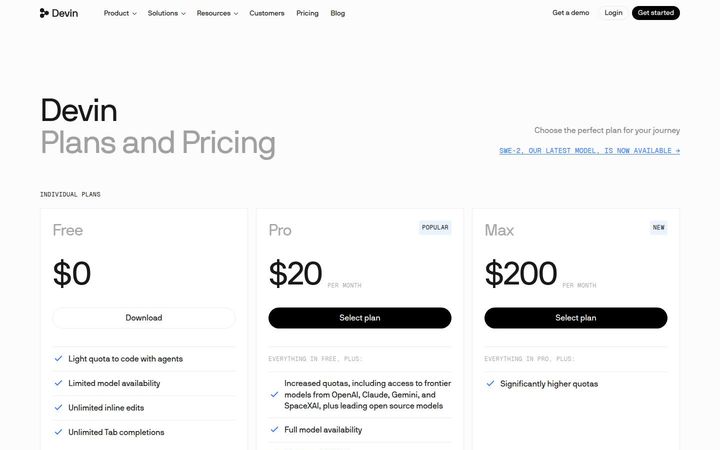
Devin
$20/moDevin sells agent usage as subscription quotas: Free, Pro at $20, Max at $200, a Teams plan at $80 per month plus $40 per full dev seat for up to 200 users, and Enterprise by conversation. Each paid plan carries an allowance that refreshes daily and weekly, and usage past it is bought 'at API pricing', so the subscription covers typical work and the meter covers the heavy days. The Teams line prints a two-part tariff, a platform fee plus a seat price, in one sentence, and a 200-user ceiling marks where Enterprise begins.
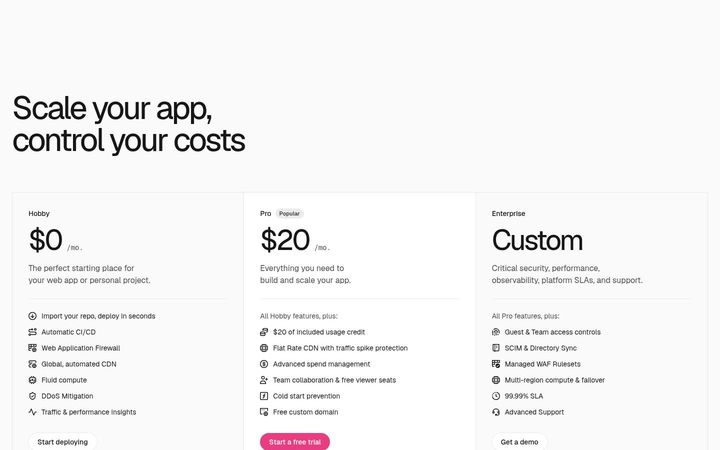
Vercel
$20/moVercel prices a cloud platform as a seat plus usage: Pro is $20 a month per developer seat and includes '$20 of included usage credit', so the seat fee doubles as a usage allowance before metered rates apply. Beneath three plan cards sits a full rate card in which every metered resource prints its included quota and its overage price on the same row, from CDN Requests to build minutes, and it now extends to Vercel Drives, Vercel Daemons, Deployment Storage and Tracing Spans.

Cursor
$8/moCursor sells AI usage in multiples of one plan: Free is $0 /month, Plus $8 /month, Premium $30 /month and Super $100 /month on the cards, with Ultra at $200/month, Teams at $30+/user/month and a Custom Enterprise tier in the comparison table. Each paid step is defined as more usage compared to Plus, and the subscription bundles Cursor, Grok and X benefits into one plan. Third-party models sit outside the price at API list rates, which keeps pass-through cost apart from the bundle.

LangChain
$39/seat/moLangSmith sells three plans: Developer at $0 per seat, Plus at $39 per seat and a custom Enterprise, with the two self-serve plans followed by 'then pay as you go'. Every service beyond the seat meters in one unit, 'LangChain Standard Units. $1.00 / LSU', at a published rate per resource. A usage calculator built as a stack picker turns those rates into a monthly estimate a buyer can share.

Replit
$18/mo (billed annually)Replit sells subscriptions that carry a dollar allowance for AI models, '$20 towards more powerful models' on Core and '$100 towards most powerful models' on Pro, with metering behind it on Effort-Based Pricing. The Pro card holds a credit dropdown that steps from '$90 / month' to '$2,000 / month', and the Enterprise card reads as a governance package led by 'SSO, SCIM & audit logs'.
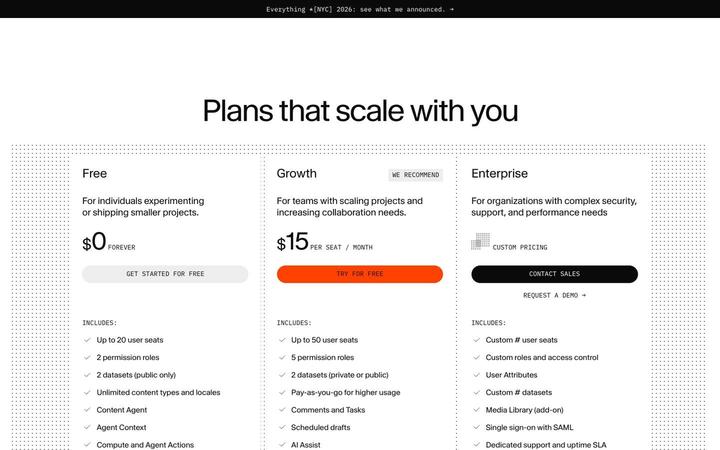
Sanity
$15/seat/moSanity charges '$15 PER SEAT / MONTH' on Growth and meters the content platform underneath: documents, API requests, bandwidth, assets, embeddings, AI credits, functions and compute each carry a printed overage rate in the comparison table. Seats price the editorial team, usage prices the delivery workload, and three add-ons price support, quota and datasets as fixed monthly blocks.