
Captured October 19, 2026 at 1440px wide. The page continues below the crop (12,281px in total).
Loom plans and prices
| Plan | Price | Billing |
|---|---|---|
| StarterGet started with video communication | $0 | |
| BusinessMove work forward faster with unlimited videos and basic editing | $18 | per user / month |
| Business + AIHighlightedCommunicate your best with videos instantly enhanced and edited with Loom AI | $24 | per user / month |
| EnterpriseControl and securely manage your video content for the entire organization | Let’s Talk |
As printed on the page captured October 19, 2026.
How does Loom pricing work?
The seat is the value metric, and the packaging steps up from volume to intelligence to control. Starter is '$0' with '25 videos', '5 minute screen recordings' and 'Unlimited meeting length', so the free plan caps how much a person records. Business lifts those caps with 'Unlimited videos', 'Unlimited recording time', 'Basic waveform editing' and 'Remove Loom branding'. Business + AI adds the AI layer, 'Auto-video enhancement', 'Record for agents', 'Video-to-text automation', 'Auto-meeting recap emails' and 'Auto-meeting notes', for $6 more per user per month. Enterprise adds 'Advanced security (SSO, SCIM)', 'Salesforce integration', '99.95% uptime SLA' and 'EBA Compliance'.
The motion is self-serve through Business + AI and sales-led at the top. The nav carries both 'Get Loom for free' and 'Contact Sales', the cards run 'Sign up', 'Try for free', 'Try for free' and 'Contact Sales', and Enterprise reads "Let's Talk", which leaves room to shape seat volume and term. Above the cards a 'Team size:' field set to 100 users sits beside 'Bill me:' with Monthly selected and 'SAVE UP TO 17%' on the annual option. A navy 'Loom AI' band follows the cards with 'Just hit record and Loom AI will do the rest.' and its own 'Try for free', then a comparison table with per-plan buttons in its header runs through workspace, AI, recording, editing, branding, analytics, security, admin and integrations. An education offer and an FAQ close the visible page; the capture runs to 12,281px and the screenshot stops at 9,000px, inside the FAQ.
Under the hood, AI is priced as a seat upgrade: one SKU at a higher per-user rate carries every AI feature, which keeps billing simple and makes AI adoption a plan decision for the whole workspace. Two AI features, 'Auto Titles' and 'Auto CTA', appear on every plan, so free users meet the AI before they pay for it. Enterprise security runs on 'Atlassian Guard Standard (SSO, SCIM)', and an FAQ on 'buying Loom on Loom.com versus Atlassian.com' points to a second purchase channel through the parent company. Worth borrowing are the AI-as-tier packaging with a taste of AI on free plans, and a free plan that caps output per person while leaving meetings unlimited.
What does Loom's pricing page do well?
- Starter caps output, '25 videos' and '5 minute screen recordings', and leaves 'Unlimited meeting length', so the upgrade trigger is recording volume
- A dedicated Loom AI band between the cards and the table explains the AI tier with its own 'Try for free'
- The comparison table header repeats a button for each plan, so a buyer can act from any row
- The table prints quality as a gate, 'Up to 720p' on Starter and 'High-definition up to 4k' on paid plans
- An education band, 'Are you a student or teacher? Try our discounted plan.', routes a distinct segment to its own offer
What does Loom's pricing page reveal about its pricing strategy?
- AI is a tier, not an add-on: Business + AI at '$24 per user / month' carries every AI feature for $6 more per user than Business
- 'Auto Titles' and 'Auto CTA' run on every plan, a sample of the AI that sets up the upgrade
- Monthly is the default billing view, with 'SAVE UP TO 17%' on the annual option
- Enterprise security runs on 'Atlassian Guard Standard (SSO, SCIM)', tying Loom's top tier to the parent company's identity platform
- An FAQ on 'buying Loom on Loom.com versus Atlassian.com' shows two purchase channels for one product
Learn with Orb
- GuideBuild a pricing and packaging strategy in 9 steps Loom's four plans step from volume ('25 videos' free) to AI ('$24 per user / month') to control (SSO, SCIM, SLA); the guide covers deciding who each plan is for and what separates them.
- Guide8 SaaS pricing best practices with concrete examples Starter caps output at '25 videos' and '5 minute screen recordings' while meetings stay unlimited; Orb's practices include free plans generous enough to attract users and limited enough to prompt an upgrade.
- GuideHow to price your AI agent: a framework Loom prices every AI feature, from 'Auto-meeting notes' to 'Record for agents', as a $6 per user step from Business to Business + AI; the framework weighs models like this against the compute cost that each use carries.
Questions about Loom pricing
How much does Loom cost?
Loom's pricing starts at $18/user/mo. The page shows 4 plans, including a free plan, with the top plan priced through sales. Paying annually saves 17%.
What pricing model does Loom use?
Loom prices per seat. Buyers can sign up on their own or go through the sales team. Its plans are aimed mainly at small businesses.
Does Loom have a free plan?
Yes, Loom has a free plan, and its paid plans offer a free trial. Paid plans start at $18/user/mo.
Does Loom offer an annual discount?
Yes, paying annually saves 17%. A toggle on the page switches between monthly and annual prices. The listed prices start at $18/user/mo. Terms for the plans priced through sales are set with the sales team.
How is Loom's pricing page laid out?
The page shows 4 plans, highlights Business + AI, and includes a comparison table and an FAQ. The breakdown above marks 14 points on it: 6 things it does well and 8 insights into the pricing.
What does Loom Business + AI add over Loom Business?
Loom Business + AI is priced at "$24 per user / month" compared with "$18 per user / month" for Business, and it includes everything in Business. It adds Auto-video enhancement, Record for agents, Advanced editing, Video-to-text automation, Auto-meeting recap emails, Auto-meeting notes and Admin insights. The comparison table also lists Auto Summaries, Auto Chapters, Filler Word Removal, Silence Removal and AI Workflows as included on Business + AI and Enterprise. The plan carries the "MOST POPULAR" label and offers a "Try for free" button.
Which Loom AI features are included on the free Starter plan?
Loom includes "Auto Titles" and "Auto CTA" on every plan, including the $0 Starter plan. Starter also comes with "Transcriptions in 50+ languages", plus transcriptions and closed captions. The full Loom AI suite, including auto-meeting notes, recaps and summaries, is available on Business + AI and Enterprise.
What security and admin features come with Loom Enterprise?
Loom Enterprise includes everything in Business + AI, plus "Advanced security (SSO, SCIM)" delivered through "Atlassian Guard Standard (SSO, SCIM)". It also adds a "Salesforce integration", a "99.95% uptime SLA", "EBA Compliance" and "Downloadable user insights". The comparison table lists "Account transfer and ownership of content" as an Enterprise feature, and pricing is arranged through the "Contact Sales" button.
From the page as captured October 19, 2026. Current prices are on loom.com
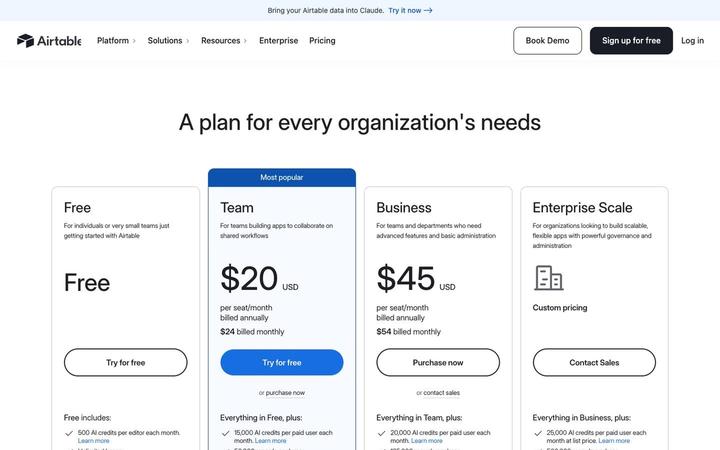
Airtable
$20/seat/moAirtable prices four plans per seat, Free, Team at $20, Business at $45 and Enterprise Scale on custom pricing, and attaches a monthly pool of AI credits to every seat. Credits are the first bullet on each card and step from 500 per editor on Free to 25,000 per paid user, with top-up packs priced in the table. Annual and monthly prices print together on each card, so the commitment discount is visible at a glance.
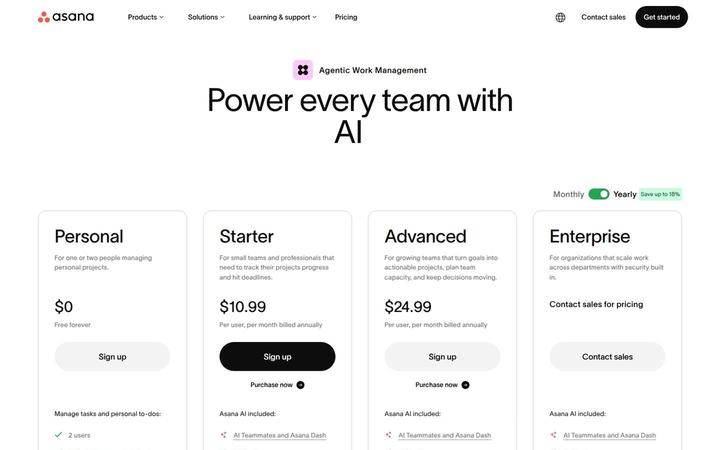
Asana
$10.99/user/moAsana pairs a per-user ladder, Personal at $0, Starter at $10.99, Advanced at $24.99 and Enterprise through sales, with a metered AI layer priced in the open. Each paid plan includes a pool of AI requests, and more cost $0.50 each in prepaid usage packs or $0.60 each pay as you go, under the banner 'One flat rate for every AI request'. Seats price the work management product, requests price the work AI Teammates and Asana Dash do, and optional modules such as Timesheets and Budgets extend down to Starter.

Calendly
$10/seat/moCalendly sells four plans, Free, Standard at $10/seat/mo, Teams at $16/seat/mo and Enterprise from $15k a year with a 50-seat floor, and it defines a seat on every paid card: hosts need one, invitees do not. The page leads with its AI add-on, Notetaker and Callie, sold as a switch inside the Standard and Teams cards, which shows a scheduling tool growing into a seat price plus an AI layer.

ClickUp
$9/seat/moClickUp prices on seats with AI built into every plan: Free Forever at $0, Core at $9 and Business at $17 per 'user / mo · billed yearly' against struck regular prices, Enterprise at 'Custom', and a MAX plan at $100. Each tier carries its own pooled credit allowance, with top-ups at '$10 per 10K credits', framed by a '100% Money-back Guarantee', a written 'SUPER FAIR BILLING POLICY' and a savings calculator that ends in 'Get a quote'.
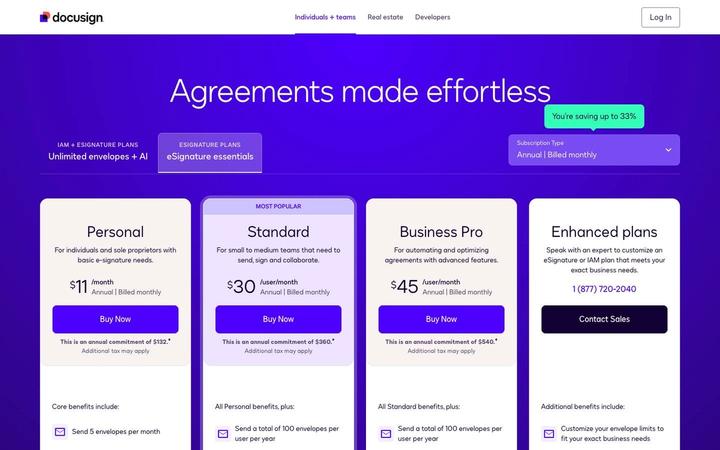
Docusign
$11/moDocusign sells eSignature per user with an envelope allowance as the second meter: Personal is $11 /month for 5 envelopes a month, Standard (MOST POPULAR) and Business Pro are $30 and $45 /user/month with 100 envelopes per user per year, and Enhanced plans run through a phone number and Contact Sales. Every paid card prints its full annual commitment under the price. The upgrade beyond eSignature is IAM, sold on 'Unlimited envelopes + AI', so envelope volume is the axis that moves a customer up the product line.
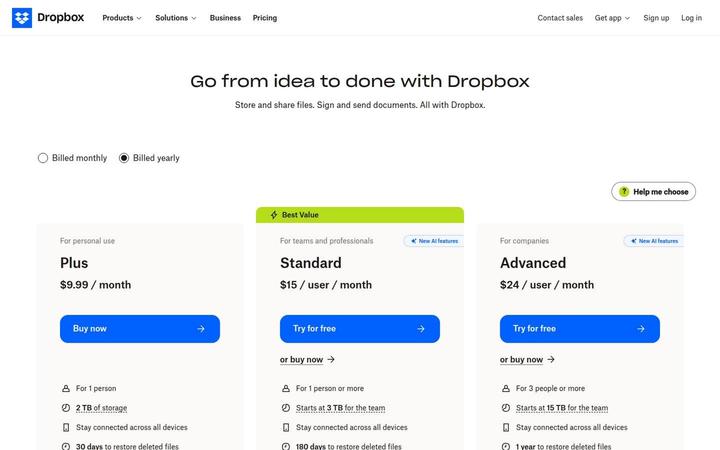
Dropbox
$9.99/moDropbox shows three paid cards, Plus at $9.99 / month for one person, Standard at $15 / user / month tagged Best Value, and Advanced at $24 / user / month for 3 people or more, with Basic Free and Enterprise in a compact row beneath. Storage is pooled at the team level, 'Starts at 3 TB for the team' on Standard and 15 TB on Advanced, and both team plans now carry 'AI in Dropbox' with a monthly AI credit allowance that scales by tier. Seats buy access, while the plan sets both the storage pool and the credit pool.